

How to increase average order value on Shopify: 8 tactics that work
Eight ways to raise average order value on Shopify, each with its Shopify setup and a worked example, plus what an app stack costs against one $15 plan. Prices checked October 2026.


Short answer
To increase average order value on Shopify, give shoppers a reason to add one more item: quantity breaks, bundles, BOGO, free shipping and free gift thresholds, cart and product page upsells, and A/B tests. Shopify's own discounts run several of these for free, and an app shows them on the product page and in the cart. Section Store Plus runs all eight for $15 a month at any revenue.
- Shopify's AOV is gross sales minus discounts divided by orders, so $12,600 from 300 orders is a $42 AOV.
- Shopify allows 25 active automatic discounts per store, app discounts included.
- Dynamic Yield's benchmark of 400+ brands runs from $59 AOV in pet care to $421 in luxury, so compare against your own baseline.
- One app per tactic (Kaching Bundles, Kaching CartDrawer, Selleasy) costs $44.98 to $223.99 a month at 150 to 1,500 orders.
- Section Store Plus runs all 8 tactics for $15 a month at any revenue.
To increase average order value on Shopify, give shoppers a reason to add one more item before they pay. Eight tactics do that: quantity breaks, bundles, buy one get one (BOGO), a free shipping threshold, a free gift at a spend threshold, cart drawer upsells, product page add-ons and A/B testing the offer. We make Section Store, so we say where other apps beat it. Section Store is a Shopify app with theme sections, bundles, a cart drawer and AI Pages. Section Store Plus is its $15 monthly plan, which covers all eight tactics.
What is average order value, and where do you find it in Shopify?
Average order value (AOV) is the average amount a customer spends per order: revenue divided by the number of orders. For example, a store that takes $12,600 from 300 orders has an AOV of $42, because $12,600 ÷ 300 = $42.
Your Shopify AOV lives in the Average order value over time report. To open it:
- In your Shopify admin, go to Analytics → Reports.
- Click the Category filter and pick Sales.
- Open Average order value over time.
- Group by week or month, and compare two date ranges to see a change.
Shopify's formula is gross sales minus discounts, divided by orders. Taxes, shipping and later edits or returns stay out. So Shopify's AOV can differ from your payment provider's figure.
What is a good AOV for a Shopify store?
A good AOV for a Shopify store is one that beats your own recent baseline. The right number depends on what you sell.
One public benchmark shows the spread. Dynamic Yield's AOV benchmark puts the global average at $182. Over twelve months, luxury and jewelry averaged $421 and pet care $59. The panel is 400+ brands, not a sample of Shopify stores, so treat it as context.
Your category, price point and shipping cost set your range. A store selling $15 refills won't match a store selling $300 jackets.
So compare against your own numbers. Use the 4 to 8 weeks before a change as your baseline. Track AOV next to conversion rate and revenue per visitor, because a higher AOV with fewer orders can earn less.
Which tactics raise AOV the most?
The tactics that raise AOV the most are the ones that match how your customers already buy. Use quantity breaks when shoppers buy multiples. Use bundles and add-ons when they buy related items. Use a free shipping threshold when shipping puts them off. No tactic wins in every store, so test yours.
Shopify's free tools handle the discount for most tactics. An app is usually what shows the offer on the product page or in the cart.
| Tactic | Where it shows | Needs an app? | Section Store Plus feature |
|---|---|---|---|
| 1. Quantity breaks | Product page | For the tier picker | Volume discount bundle |
| 2. Bundles and mix and match | Product page | For mix and match | Mix and match, Complete the bundle |
| 3. BOGO | Product page, cart | To add the free item | Buy X get Y bundle |
| 4. Free shipping threshold | Cart, checkout | For a progress bar | Reward bar: free shipping |
| 5. Free gift at a spend threshold | Cart | To add the gift | Reward bar: free gift |
| 6. Cart drawer upsells | Cart drawer | Usually | Products upsell and Order addon blocks |
| 7. Product page add-ons | Product page | For one-click checkboxes | Addons block, bundle checkbox upsells |
| 8. A/B test the offer | Whole storefront | For AOV results | A/B tests, up to 4 versions |
How do quantity breaks, bundles and BOGO raise AOV?
Quantity breaks, bundles and BOGO raise AOV by making the bigger order the better deal, right where the shopper picks a quantity. Each one trades a discount for more units, so check the margin on every tier.
1. Quantity breaks
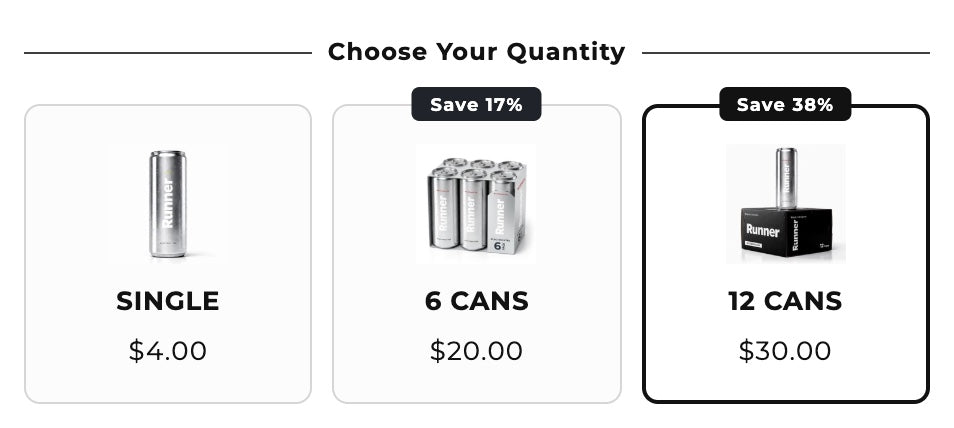
Quantity breaks lower the unit price as the shopper buys more: 1 for $20, 2 for $36, 3 for $51. They suit products people use up, like coffee, socks or skincare.
Set it up on Shopify: create an automatic Amount off products discount with a minimum quantity of items, one per tier. Each tier takes one of Shopify's 25 active automatic discounts. The discount applies in the cart. The product page doesn't show the tiers.
In Section Store Plus: a Volume discount bundle shows the tiers in the buy box and runs as a native Shopify discount. Our quantity breaks apps guide compares nine apps that do this.
Example: a $20 product costs you $8. A shopper who came for one takes the 2-pack at $36. The order grows from $20 to $36, and your margin from $12 to $20.
2. Bundles and mix and match
A bundle sells products that go together at one price, like shampoo and conditioner. Mix and match lets the shopper pick any 3 flavors for one price. Both suit stores with natural pairs or lots of variety.
Set it up on Shopify: the free Shopify Bundles app makes fixed bundles and multipacks. Mix and match needs an app. Our guide to creating bundles on Shopify covers four methods.
In Section Store Plus: Mix and match and Complete the bundle offers sit in the buy box, and any offer can add a free gift. The bundle and quantity break apps comparison prices the alternatives.
Example: shampoo costs $18 and conditioner $16. You sell both for $30 instead of $34. A shopper who came for the shampoo takes the set, so the order grows from $18 to $30.
3. Buy one, get one (BOGO)
BOGO gives a free or cheaper item when the shopper buys a set number, like "buy 2, get 1 free". The deal suits cheap repeat items and old stock.
Set it up on Shopify: create an automatic Buy X get Y discount. Shopify never adds the free item to the cart, so shoppers must add it. Below Shopify Plus, products in the deal can't take other product discounts.
In Section Store Plus: a Buy X get Y bundle shows the deal in the buy box and adds the free item for the shopper. Our Shopify BOGO guide covers both setups.
Example: socks sell for $15 a pair and cost you $4. With buy 2, get 1 free, a shopper who wanted one pair pays $30 for three. The order doubles, and your margin grows from $11 to $18. A shopper who wanted three anyway pays $30 instead of $45. You lose $15 on that order.
How do free shipping and free gift thresholds raise AOV?
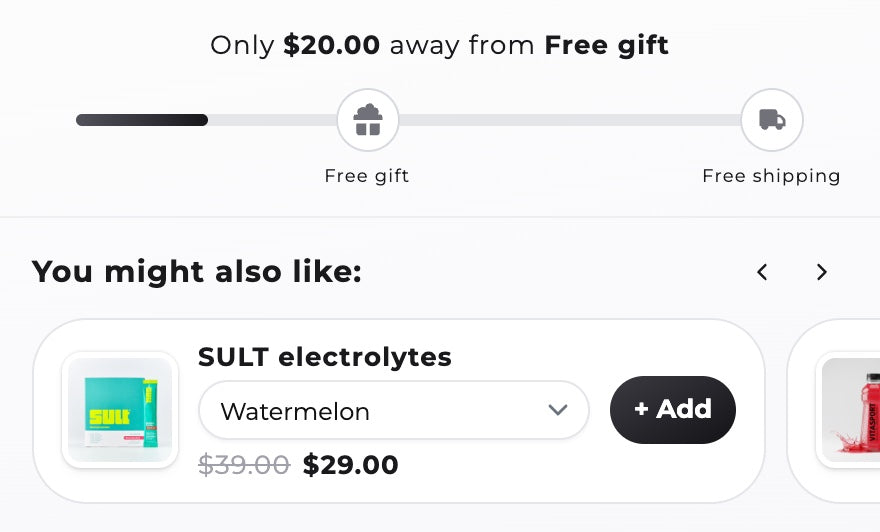
Free shipping and free gift thresholds raise AOV by giving shoppers a spend target, shown in the cart. Set the target a little above your current AOV. Too high and shoppers give up. Too low and you pay for orders that would have come anyway.
4. Free shipping threshold
A free shipping threshold drops the shipping fee once the cart passes a set amount, like $50. The tactic suits stores where shipping is a big share of a small order.
Set it up on Shopify: create an automatic Free shipping discount with a minimum purchase amount. A progress bar like "$8 away from free shipping" needs an app unless your theme has one.
In Section Store Plus: the cart drawer's reward bar unlocks free shipping by cart total or item count. You can set a fixed threshold per market. Our cart drawer apps comparison covers other reward bars.
Example: your AOV is $42 and shipping costs you $6. You set free shipping at $50. A shopper at $42 adds a $12 item to qualify. At a 60% margin, that item earns $7.20, and you now pay the $6 shipping. You're $1.20 ahead, so check the math before you pick a threshold.
5. Free gift at a spend threshold
A free gift at a spend threshold adds a gift once the cart passes a set amount, like a travel-size product over $60. Pick a gift that feels worth more than it costs you, such as a sample or a new product.
Set it up on Shopify: create a Buy X get Y discount with a minimum purchase amount and the gift set to Free. The shopper still has to find the gift and add it.
In Section Store Plus: a free gift tier on the reward bar adds the gift when the cart qualifies. The gift comes out again if the cart drops below. Our free gift with purchase guide shows the setup.
Example: the gift costs you $5 and the threshold is $60. A shopper at $48 adds a $15 item, so the order grows to $63. At a 60% margin, the item earns $9. After the gift, you keep $4 more.
Where should upsells go: product page, cart or checkout?
Upsells belong on the product page and in the cart, where the shopper is still choosing. Checkout and post-purchase offers need a different kind of app. The cart drawer is a good first spot, because every shopper who adds to cart sees it.
6. Cart drawer upsells
A cart drawer upsell suggests one more product in the slide-out cart, after the shopper has decided to buy. Offer cheap, related items, like a refill, a case or a sample size.
Set it up on Shopify: check your theme's cart settings first. Shopify's free complementary products block sits on the product page, so a cart upsell usually needs an app.
In Section Store Plus: the Products upsell block shows Shopify's recommendations or products you pick by rule. An Order addon adds a one-tap extra, like shipping protection, never pre-checked.
Example: you offer a $9 add-on in the cart, and 1 in 10 orders take it. Over 100 orders, that's 10 × $9 = $90, so AOV rises by $0.90. The take rate is an assumption. An A/B test gives you the real one.
7. Product page add-ons
A product page add-on is a checkbox or small card next to the buy button, like "Add a case, $12". The shopper gets both in one click. Add-ons suit products with accessories, warranties or gift wrap.
Set it up on Shopify: in Search & Discovery, pick up to 10 complementary products, then add the Complementary products block in a compatible theme. A one-click checkbox needs an app.
In Section Store Plus: the Addons block adds a switch, checkbox or radio that goes to the cart with the main product. A bundle's checkbox upsell can discount the add-on. See how to add upsell add-ons to a Shopify product page.
Example: a $12 case shows as a checkbox next to a $30 phone stand. If 1 in 5 orders tick it, 100 orders bring 20 × $12 = $240 more. AOV rises by $2.40.
What about checkout and post-purchase upsells?
Section Store Plus doesn't show checkout or post-purchase upsells. Selleasy covers the product page, cart, checkout and post-purchase. Its $49 Pro plan adds checkout upsells for Shopify Plus stores. Our upsell apps comparison sorts the options by placement.
How do you know which offer raises AOV?
An A/B test shows which offer raises AOV by splitting visitors between versions at the same time. Judge the winner on revenue per visitor, not AOV alone. A higher threshold can lift AOV and still lose money.
8. A/B test the offer
An A/B test shows two or more versions of an offer to different visitors and compares what they spend. It works when you change one thing at a time and let the test run until each version has a fair number of orders.
Set it up on Shopify: Rollouts, under Markets → Rollouts, can run an experiment on theme and discount changes. Experiments need the Grow plan or higher. Their theme experiment metrics include conversion rate and add to cart rate, but not AOV.
In Section Store Plus: A/B tests run up to 4 versions of a bundle or the cart drawer on paid orders. They report AOV and revenue per visitor. Kaching Bundles also has built-in A/B testing.
Example: 1,000 visitors see each version. Version A has free shipping at $50 and gets 30 orders at $42, so $1.26 per visitor. Version B moves the threshold to $75 and gets 25 orders at $48, so $1.20 per visitor. B raised AOV by $6 and still earned $60 less.
What does an AOV app stack cost?
An AOV app stack with one specialist app per job costs $44.98 to $223.99 a month at the store sizes below. Section Store Plus covers the same eight tactics for $15. The stack is Kaching Bundles for product page offers, Kaching CartDrawer for the cart and rewards, and Selleasy for add-ons.
The gap grows with the store, because Kaching Bundles bills by the revenue it counts and Kaching CartDrawer by orders.
| App | Rating | 150 orders, $1,000 bundle revenue | 400 orders, $5,000 | 800 orders, $10,000 | 1,500 orders, $25,000 |
|---|---|---|---|---|---|
| Kaching Bundles | 5.0 (6,281) | $14.99 | $29.99 | $59.99 | $149 |
| Kaching CartDrawer | 5.0 (1,497) | $14.99 | $24.99 | $39.99 | $59.99 |
| Upsell & Cross Sell — Selleasy | 4.9 (2,756) | $15 | $15 | $15 | $15 |
| Three apps together | $44.98 | $69.98 | $114.98 | $223.99 | |
| Section Store Plus | 4.9 (2,976) | $15 | $15 | $15 | $15 |
The table assumes Kaching counts all bundle revenue as "additional revenue", which Kaching doesn't define in public. Kaching CartDrawer bills on every monthly order. Selleasy is on its $15 Starter plan, for stores past 50 orders. Kaching Bundles includes A/B testing, so there's no fourth app.
The stack can cost less. Kaching Bundles also lists add-ons, so two Kaching apps cost $54.98 at 400 orders. On October 13, 2026, Kaching's pricing page offered 50% off for installing three of its apps. On the same date, UpCart's App Store listing said it is not currently available, so it isn't priced here.
Section Store Plus wins on price and on having every tactic in one app. The specialists win in other places.
- $15 a month at any revenue, no revenue share
- All eight tactics in one app
- A/B tests on paid orders for bundles and the cart
- Fewer reviews: 2,900+ vs 6,281 for Kaching Bundles
- No checkout or post-purchase upsells. Selleasy has both
- One bundle per product at a time, with results only inside A/B tests
For BOGO and free gifts alone, BOGOS: Free Gift Bundle Upsell has 4,484 reviews and runs its offers in Shopify POS. BOGOS is free for 30 lifetime orders, then $29.99 to $109.99 a month depending on your Shopify plan.
The cheapest route costs $0. Shopify's own discounts, Shopify Bundles and Search & Discovery cover part of most tactics. You give up the tier picker, automatic gifts and cart upsells. Our Shopify discount apps comparison prices more options side by side.
Start with Shopify's free shipping discount if you want to improve AOV with one tactic this week. Add a bundle app when you want tiers on the product page. Pick Section Store Plus for bundles, a cart drawer with rewards and upsells, and A/B tests at $15 a month. Pick Selleasy or another upsell app if checkout and post-purchase offers matter most.
How we compared
On October 13, 2026 we read Shopify's help center for every native setup and limit. We also read each app's Shopify App Store listing and the vendor's pricing page. Prices are list prices with monthly billing, in USD. We didn't install the other apps.
The worked examples use round numbers to show the arithmetic. They aren't results from real stores. We make Section Store, and its facts come from our own product. The tactics are numbered for reference, not ranked.
Sources: Shopify automatic discounts, discount combinations, Section Store, Kaching Bundles pricing, Kaching CartDrawer pricing, Selleasy, BOGOS.
Frequently asked questions
Which Shopify upsell app increases average order value?
No upsell app raises AOV by itself. The offer and where it shows do. Section Store Plus covers product page and cart drawer upsells, bundles and a reward bar for $15 a month. Selleasy covers more placements, including checkout and post-purchase, and is free under 50 orders. Test either one and keep the version with more revenue per visitor.
How do you calculate average order value on Shopify?
Divide revenue by the number of orders. Shopify's own report uses gross sales minus discounts, divided by orders, so taxes, shipping and later edits stay out. Find it in your Shopify admin under Analytics → Reports. Filter the category to Sales and open Average order value over time.
Is a high AOV always good?
No. A high AOV is good only when revenue per visitor and profit rise with it. A bigger discount or a higher free shipping threshold can raise AOV while fewer people buy. Track AOV next to conversion rate, revenue per visitor and margin per order, and compare against your own baseline.
Can you increase AOV on Shopify without an app?
Yes, in part. Shopify's own discounts handle quantity tiers, buy X get Y, free gifts and free shipping thresholds. Shopify Bundles makes fixed bundles for free. The limits: tiers show only in the cart, Shopify never adds free items to the cart, and each automatic discount uses one of 25 slots.
Do free gifts and BOGO increase average order value?
Free gifts and BOGO raise AOV when shoppers add units or spend to qualify. A buy 2, get 1 free deal doubles a one-unit order. A free gift over $60 pulls a $48 cart past $60. Both lose money on shoppers who would have spent that much anyway, so test them first.
How much do AOV and upsell apps cost?
AOV apps charge by revenue, by orders or a flat fee. At 400 orders and $5,000 of bundle revenue, Kaching Bundles costs $29.99, Kaching CartDrawer $24.99 and Selleasy $15, so $69.98 together. Section Store Plus is $15 a month for all eight tactics at any revenue. Prices checked October 13, 2026.
Which apps let customers see bulk pricing before adding to cart?
Quantity breaks apps show bulk pricing in the buy box, before the shopper adds to cart. Section Store Plus and Kaching Bundles both do. Shopify's own minimum-quantity discount doesn't. It applies the lower price in the cart, so shoppers see the saving only after they add the items.
Does Section Store Plus do checkout or post-purchase upsells?
No. Section Store Plus shows offers on the product page and in the cart drawer: bundles, quantity breaks, add-ons, a reward bar and cart upsells. For checkout or thank-you page offers, add an app like Selleasy. Its $49 Pro plan adds checkout upsells for Shopify Plus stores.
Prices and features checked on October 13, 2026. We update this page when they change.


