
How to add a free shipping progress bar to your Shopify cart (2026)
Shopify's free themes have no free shipping progress bar. Set the free shipping rule first, then add the bar with a tested Liquid snippet or a cart app. Checked October 30, 2026.


Short answer
Shopify's free themes, Dawn and Horizon, have no free shipping progress bar. First offer free shipping over an amount, with a shipping rate or a free shipping discount. Then add the bar with a Liquid snippet in the cart drawer, or with a cart app. Section Store Plus does both the bar and the discount for $15 a month, flat.
- Dawn and Horizon have a cart drawer but no free shipping bar setting, checked in their code on October 30, 2026.
- Set free shipping first: a $0 rate by order amount, or an automatic free shipping discount with a minimum purchase amount.
- A Liquid snippet in snippets/cart-drawer.liquid adds the bar in Dawn, but only in one currency.
- A bar shows the goal. The free shipping itself comes from Shopify's rate or discount, or from an app that applies it.
- Section Store Plus adds the bar, applies the free shipping and converts the goal per currency for $15 a month, flat.
To add a free shipping progress bar to your Shopify cart, first offer free shipping over an amount in Shopify. Then add the bar with a few lines of theme code or with a cart app. Shopify's free themes, Dawn and Horizon, have a cart drawer but no free shipping bar in their settings.
A free shipping progress bar is a line in the cart, such as "You're $27 away from free shipping", above a bar that fills as the cart grows. This guide shows Shopify's own steps first, then the code route, then the app route. We make Section Store, one of the apps, so we say where other apps beat it. Section Store is a Shopify app with a cart drawer, bundles, AI Pages and theme sections. Section Store Plus is its plan at $15 a month, flat.
Does Shopify have a built-in free shipping progress bar?
No. Shopify's free themes, Dawn and Horizon, have no free shipping progress bar. Their cart settings cover the cart type, a cart note and a few display options. Shopify can give free shipping over an amount, through a shipping rate or a discount. Showing shoppers how far they are from it takes theme code or an app.
Here's what the theme editor offers. Open Online Store, click Edit theme, click the Theme settings icon, then Cart.
| Theme | Cart type options | Other cart settings | Free shipping bar |
|---|---|---|---|
| Dawn | Drawer, Page, Popup notification | Vendor, Cart note, a collection for the empty drawer, color scheme | No |
| Horizon | Page, Drawer | "Add to cart" auto-opens drawer, Allow note to seller, empty cart button link, thumbnail borders | No |
Horizon's cart drawer section has no blocks or settings of its own. Horizon's cart page takes text and app blocks, but a text block can't count down. Some paid themes include a bar. Check your theme's Cart settings before you add code.
Step 1: How do you offer free shipping over an amount on Shopify?
You offer free shipping over an amount in one of two ways. A free shipping rate gives every order above a set total a $0 rate at checkout. A free shipping discount does the same as an automatic discount, with a title shoppers see in the cart. Set one of them first. The bar only shows the goal.
Option A: a free rate, by order amount. From Shopify's shipping rates guide:
- Go to Settings → Shipping and delivery.
- Under Shipping profiles, click the profile you use.
- For the zone, click Add shipping option and name it, such as "Free shipping".
- Set Rate type to Order amount.
- Enter the Minimum, such as 75. Leave Maximum empty.
- Leave Price empty or enter 0. Click Done, then Save.
Option B: an automatic free shipping discount. From Shopify's free shipping discount guide:
- Go to Discounts and click Create discount. Pick Free shipping.
- Under Method, select Automatic discount. Enter a title, such as "Free shipping over $75". Shoppers see it in the cart and at checkout.
- Under Countries, keep All countries or pick some.
- Optional: check Exclude shipping rates over a certain amount, so express rates stay paid.
- Under the minimum requirements, choose Minimum purchase amount and enter 75.
- Set Combinations and dates, then save.
The discount's minimum counts product prices only, not tax. Shopify is moving some stores to shipping options by market, so your menu names may differ. We checked these steps on October 30, 2026.
Step 2: How do you add the progress bar with code?
You add the bar with code by pasting a Liquid snippet into your theme's cart drawer file. In Dawn, that file is snippets/cart-drawer.liquid. Dawn redraws the drawer after each add, change or removal, so the bar stays current without a page reload. The snippet only shows a message. It doesn't give free shipping.
- Go to Online Store → Themes. Duplicate your theme, so you can test on a copy.
- On the copy, click the … menu, then Edit code.
- Open
snippets/cart-drawer.liquid. Find the line that starts with<cart-drawer-items. - Paste the snippet below on the line above it.
- Change
7500to your goal in cents. 7500 is $75.00. - Save. Preview the copy, add products and change quantities.
- Publish the copy when the bar works.
{%- comment -%} Free shipping bar. Goal in cents: 7500 = $75.00 {%- endcomment -%}
{%- liquid
  assign goal = 7500
  assign remaining = goal | minus: cart.total_price
  assign percent = cart.total_price | times: 100 | divided_by: goal
  if percent > 100
    assign percent = 100
  endif
-%}
{%- if cart.item_count > 0 -%}
  <div class="free-shipping-bar" style="padding: 1.2rem 0;">
    {%- if remaining > 0 -%}
      <p>You're {{ remaining | money }} away from free shipping.</p>
    {%- else -%}
      <p>You've unlocked free shipping.</p>
    {%- endif -%}
    <progress value="{{ percent }}" max="100" style="width: 100%;" aria-label="Progress to free shipping"></progress>
  </div>
{%- endif -%}
We tested the snippet's logic with carts of $0, $48, $75 and $120. At $48 it reads "You're $27.00 away from free shipping" with the bar at 64%.
Know the limits of the code route. The goal is one number in one currency. A store that sells in several currencies shows the wrong amount abroad. The snippet compares the cart total after cart discounts, which can differ from your shipping rule's total. A theme update can drop your edit. Horizon also keeps its drawer in snippets/cart-drawer.liquid, but the markup differs, so test every cart action there.
How do you add a free shipping bar with an app?
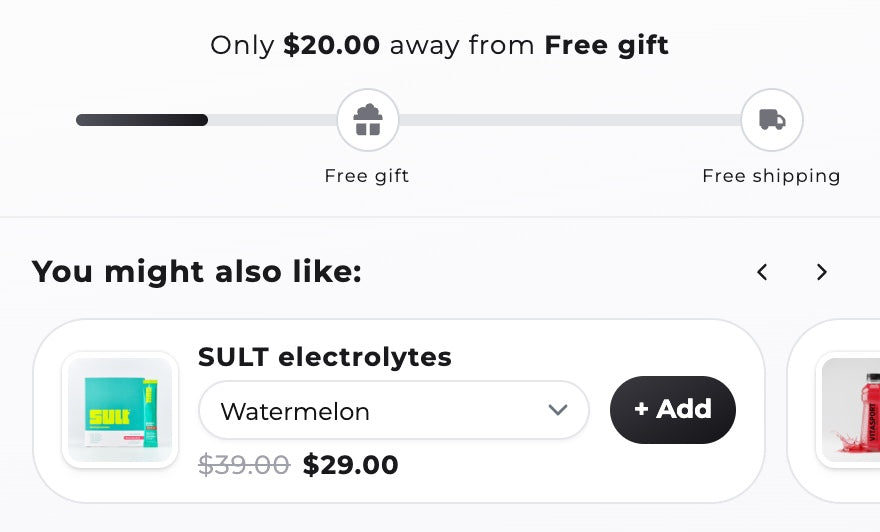
A cart app adds the bar without code and keeps it in each shopper's currency. Some apps also apply the free shipping at checkout, so you don't need a separate rule. In Section Store Plus, the bar is a reward bar in the cart drawer, and its free shipping tier is a real Shopify discount.
- In Section Store, open Cart Drawer and click Create cart drawer.
- Under Pick a cart to start from, choose Your store. It starts in your colors and language.
- Open the Reward bar block. If your cart has none, click Add block and pick Reward bar.
- Set Unlock by to Cart total.
- In the tier, set Reward type to Free shipping and Min price to your goal, such as 75.
- Click Per market to set a fixed amount for a market. Otherwise the app converts the amount into each currency.
- Under Shipping methods, set Apply to: All shipping methods, Specific shipping methods or All shipping methods except….
- Write the In-progress message. Insert the Remaining amount variable, so it reads "Add $27.00 to unlock free shipping".
- Click Add tier for a second goal, such as a Free gift at $100.
- Save and switch the cart on. If the editor shows Activate in theme, turn on the Cart drawer app embed.
Setup and preview are free. Switching the cart on needs Section Store Plus at $15 a month, flat, with a 14-day free trial. The reward bar counts the cart subtotal before discounts. You can leave up to 20 products out of the count, such as gift cards. Shopify applies only one shipping discount per order, so turn off an older free shipping discount with the same goal.
Two other apps, from their App Store listings on October 30, 2026:
- Hextom: Free Shipping Bar is a bar-only app, rated 4.9 from 3,047 reviews. The Basic plan is free. Premium at $9.99 a month adds Shopify Markets targeting and currency conversion. It shows the message, so set your free shipping rule in Shopify first. It's the cheapest pick if you keep your theme's cart.
- Essent Cart Drawer is a full cart drawer, rated 5.0 from 1,146 reviews. It's free up to 30 orders a month with every feature. Paid plans start at $8.99 for 99 orders and reach $23.99 at 499. It's the better free start for a small store that wants upsells too.
How do I add a cart drawer with upsells and a free shipping bar to the Dawn theme?
Dawn already has a cart drawer. Set Theme settings → Cart → Type to Drawer. It has no free shipping bar and no upsells, only a collection when the cart is empty. Add the bar with the snippet above. For upsells and the bar together without code, a cart drawer app replaces Dawn's drawer.
In Section Store, three blocks cover it:
- Reward bar: free shipping, an order discount or a free gift at each tier.
- Products upsell: Shopify's related or complementary recommendations, or your own rules by product or collection.
- Order addon: a one-product opt-in, such as shipping protection. It's never pre-checked.
See every option side by side in our Shopify cart drawer apps comparison. For upsells beyond the cart, see Shopify upsell apps compared. To build the drawer by chatting instead, see how to build a cart drawer with Claude or ChatGPT.
Which cart drawer app works with the Shopify Horizon theme?
A cart drawer app works with Horizon when it stops Horizon's own drawer and keeps the cart count right. Horizon is one of Shopify's newer free themes, and its drawer has no reward bar. Section Store's cart drawer has code written for Horizon's drawer. Whichever app you pick, test it on a copy of your theme first.
Section Store's Horizon code does two jobs we can point to. It turns off Horizon's own drawer, so two drawers never open. It updates the cart count bubble in Horizon's header. Before you switch any cart app on, run this test on a duplicate theme:
- Add a product from a product page, a collection page and a quick add button.
- Change the quantity in the drawer, then remove the item.
- Check the cart count in the header after each step.
- Open the cart on a phone.
If two drawers open, or the count lags, ask the app's support before you go live.
Where do Shopify's own tools stop?
Shopify's own tools stop at the message. Shopify gives free shipping over an amount through a rate or a discount. It doesn't show shoppers how far they are from it in Dawn or Horizon. It also can't add a gift at a threshold, and its free themes have no upsells in the drawer. Code or an app covers each gap.
| Job | Shopify alone | What's missing |
|---|---|---|
| Free shipping over $75 | Yes, a rate or a discount | Nothing |
| Show "$27 to go" in the cart | No, in Dawn and Horizon | A bar, by code or app |
| A different goal per currency | Rates and discounts by zone or country | A bar that shows each local goal |
| A free gift at a threshold | A Buy X get Y discount | Adding the gift to the cart |
| Upsells in the cart drawer | No | An upsell block, by code or app |
What free shipping threshold should you set?
Set the free shipping threshold a little above your average order value. Then most shoppers need one more item to reach it. Find your average order value in Shopify's Analytics. Check that the extra margin pays for the shipping you give away. Our guide on how to set a free shipping threshold has a calculator.
Example, with made-up numbers. Your average order is $60 and shipping costs you $7. A goal of $75 asks for one more $15 to $20 item. If that item earns you more than $7, the offer pays for itself.
Free shipping is one of several ways to lift order value. See how to increase average order value on Shopify. To add a gift tier to the same bar, see how to add a free gift to the cart automatically. Bundles raise it on the product page: see how to create bundles on Shopify.
How we checked
We read Shopify's help pages on shipping rates, free shipping discounts and theme settings on October 30, 2026. We read the cart settings in Dawn's and Horizon's code on GitHub that day. We ran the snippet's logic on four sample carts. Rival prices come from the App Store that day. We didn't install rival apps.
Frequently asked questions
Does Shopify's Dawn theme have a free shipping bar?
No. Dawn's cart settings are the cart type, vendor, cart note, an empty-drawer collection and the color scheme. There is no free shipping bar. You can add one with a Liquid snippet in snippets/cart-drawer.liquid, or with a cart app.
Does the Horizon theme have a free shipping progress bar?
No. Horizon's cart settings cover the cart type, auto-opening the drawer, a note to the seller and some display options. Its cart drawer has no blocks or settings to add one. Use theme code or a cart drawer app that supports Horizon.
Can I add a free shipping bar without an app?
Yes. Paste a Liquid snippet into your theme's cart drawer file and set your goal in cents. It works in one currency and needs care after theme updates. Set up the free shipping rate or discount in Shopify too, because the snippet only shows the message.
Does a free shipping bar give free shipping by itself?
Not always. A code snippet or a bar-only app shows the message, and Shopify's rate or discount gives the free shipping. Some cart apps apply it too. Section Store's free shipping tier is a Shopify discount, so the bar and the checkout match.
How do I show the free shipping goal in each currency?
Use an app that converts the goal or lets you set one per market. Section Store's reward bar converts one amount into each currency, or takes a fixed amount per market. Hextom's Premium plan converts the amount too. A one-number Liquid snippet can't.
Can the same bar unlock a free gift?
Yes, in a cart app with tiers. In Section Store, add a tier with the reward type Free gift, such as a gift at $100 after free shipping at $75. The drawer adds the gift when the cart passes the goal and removes it when the cart drops.
What does a free shipping bar app cost?
Hextom's Free Shipping Bar is free, or $9.99 a month on Premium. Essent Cart Drawer is free up to 30 orders a month, then from $8.99. Section Store Plus is $15 a month, flat, with a cart drawer, upsells and bundles. Prices are from the App Store on October 30, 2026.
Prices and features checked on October 30, 2026. We update this page when they change.


