

How to build a Shopify cart drawer with Claude or ChatGPT (no code)
How to connect Claude, ChatGPT or Grok to a Shopify cart drawer over MCP and build a free shipping bar, upsells and trust badges in plain words, with what the assistant must confirm before checkout prices change. Checked October 2026.


Short answer
You can build a Shopify cart drawer with Claude or ChatGPT by connecting it to a cart app over MCP. With Section Store, paste https://mcp.section.store/mcp into the assistant's connectors, approve your store, then ask for a free shipping bar, upsells and trust badges. The assistant confirms every reward before it changes checkout. Showing the cart to shoppers needs Section Store Plus at $15 a month.
- An assistant can set 14 cart drawer sections over MCP, from the reward bar to the checkout button.
- The reward bar has 3 reward types: free shipping, an order discount and a free gift.
- One Shopify automatic discount applies every reward tier, so the cart uses 1 of Shopify's 25 slots.
- In a 6-cart test, copying from screenshots with 4 preview rounds raised the average match from 60 to 71.
- Rapid Cart lists MCP from $9 at 100 orders. Section Store Plus is $15 at any order count.
You can build a Shopify cart drawer with Claude or ChatGPT without writing theme code. Connect the assistant to a cart app over MCP, then ask for a free shipping bar, upsells and trust badges in plain words. Section Store is a Shopify app with theme sections, bundles, a cart drawer and AI Pages. Section Store Plus is its $15 monthly plan. We make it, and this guide says where it stops.
Can Claude or ChatGPT build a Shopify cart drawer?
Claude or ChatGPT can build a Shopify cart drawer by writing theme code or by setting up a cart app over that app's MCP server. Only the second needs no code. Shopify's own connector for Claude can't build a cart drawer. The table shows what each route gives you.
| Route | Code to keep | Bar discount | Live edits | Upsells |
|---|---|---|---|---|
| Theme code | Yes, Liquid and JavaScript | Only if you also set up a Shopify discount or rate | Through a copy of the theme | Whatever the code does |
| Shopify connector | No | No cart drawer | No, unpublished themes only | No |
| Section Store MCP | No | Yes, through one Shopify automatic discount | Yes, after you confirm a picture | Shopify's recommendations or your own rules |
The theme code route works, and tutorials for it are good. You own the code, though, and every theme update can break it. A progress bar in code also only shows a message. The free shipping still needs a matching shipping rate or discount in Shopify.
Shopify's connector for Claude manages products, orders, customers and discount codes. Its help page says a connected AI tool can't edit your live theme. It has no cart drawer to set up.
How do you connect your assistant to the cart drawer?
You connect your assistant by adding https://mcp.section.store/mcp as a connector and approving your store in the Section Store app. The same connection covers bundles and the cart drawer.
- Install Section Store from the Shopify App Store. It is free to install.
- Claude: open Settings, then Connectors. Click Add custom connector and paste the URL.
- ChatGPT: open chatgpt.com/plugins and click the plus button. Choose Add custom MCP server, paste the URL and pick OAuth.
- Grok: open grok.com/connectors. Click New Connector, then Custom, and paste the URL.
- Sign in. Enter your store on the page the assistant opens, then click Connect in Section Store inside your Shopify admin.
Then turn on the Cart drawer app embed once in your theme editor. The assistant checks this for you. When the live theme doesn't show the cart, its answer includes the link that turns it on. The app's video walkthrough shows the connection from start to finish.
What should you ask for first?
Ask for the whole cart in one message, then fix details one at a time. A new Section Store cart already starts in your store colors and language. It comes with a free shipping tier, three trust badges that state your store's own facts and a shipping protection add-on. The prompts below build on that start.
You: "Make a cart drawer. Free shipping at $50, a free tote bag at $90, two upsells from Shopify's recommendations, and payment icons under the checkout button."
-
The assistant reads your store. It calls
get_storefor your currency, plan and the live theme. -
It finds the gift. It calls
search_productsfor "tote bag" and gets the real variant id. It never guesses an id. - It confirms the money. Before it sends a reward tier, it must confirm the threshold and the reward with you. "Free shipping at $50 and a free tote at $90. Right?"
-
It builds the cart. It calls
create_cartwith your tiers, upsells and payment icons. -
It shows you the cart. It calls
render_cart_previewand shows a picture with a two-item sample cart, so the bar sits part way. - It tells you what checkout will charge. It repeats each reward, its threshold and whether the Shopify discount is active.
Good follow-ups are short, and each one is a single update_cart call:
- "Move the upsells above the line items."
- "Write the bar as: You're {{amount_remaining}} away from free shipping."
- "Show me the empty cart."
- "Add a 10-minute cart timer."
A Plus store's first cart goes live at once. Every later cart starts off. Only one cart is live at a time, and switching a new one on replaces the old one. The assistant asks you before it does that.
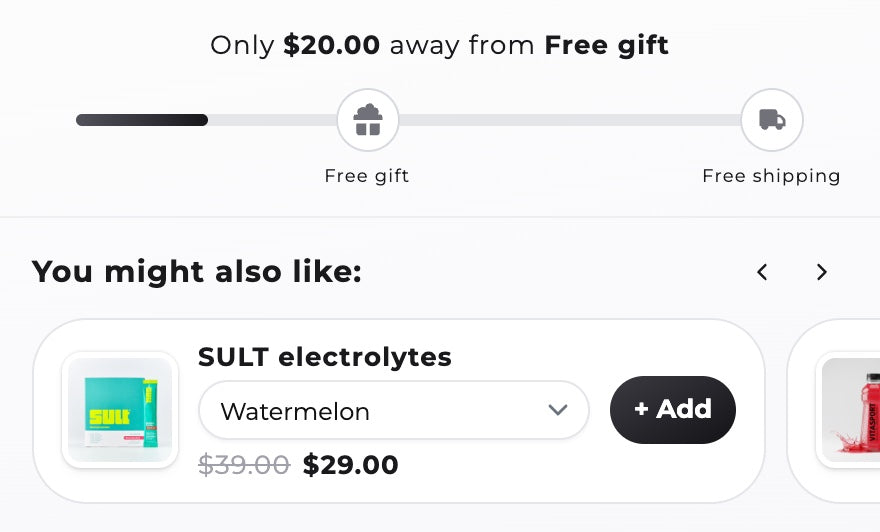
How does the free shipping bar charge the right amount at checkout?
The Section Store free shipping bar charges the right amount because one Shopify automatic discount applies every reward tier at checkout. The bar and the discount read the same tiers, so they can't drift apart. The discount is called "Section Store Cart" in your Shopify admin.
- Tiers by cart total or item count. Free shipping at $50 or at 3 items. You can set fixed thresholds per market.
- Free gifts add themselves. The gift joins the cart at its threshold and leaves when the cart drops below it.
- One discount slot. Shopify allows 25 active automatic discounts per store, app discounts included. The cart's rewards use one, however many tiers you add.
After any reward change, the assistant must tell you what the tool's result says. A typical answer starts with "Free shipping at 50." It goes on: "The Shopify automatic discount that applies them is active, so checkout charges these rewards now." If the cart isn't live yet, it says the rewards start when the cart goes live.
Can the assistant copy a cart drawer from a screenshot?
An assistant can copy a cart drawer from a screenshot by building it, rendering it and fixing what differs. Paste a screenshot of a cart you like and say "match this". The assistant asks first whether to copy that cart's colors or keep your store's own colors.
It then builds the cart with settings, renders a picture with render_cart_preview and compares the two. It patches the layout, sizes and texts, and renders again. It stops when the two match or after five rounds.
We tested this on October 13, 2026. Claude copied six real brands' cart drawers from screenshots through these tools, with four render-and-fix rounds each. An AI judge scored each copy against its screenshot. The average score rose from 60 to 71 out of 100. Four carts reached 72 to 86. Two stayed at 55, because they used parts our cart drawer doesn't have, such as a side panel and a promo banner.
Colors, corners, line item layout, quantity buttons, the close button and the cart width are all settings. Custom CSS covers what no setting does. The assistant writes CSS only, never HTML, so you can keep editing the cart in the app.
How do you A/B test the cart from chat?
You A/B test the cart from chat by asking for a test and approving its start. The assistant makes a draft test where version A is your live cart and version B starts as a copy. It changes B, shows you both pictures and starts the test once you confirm.
You: "Test free shipping at $50 against free shipping at $60 for two weeks."
Section Store calls a winner after 7 full days, 500 visitors and 20 paid orders per version. It compares revenue per visitor, conversion and paid orders. Ending the test asks you to confirm again, and it makes the version you pick the live cart. A/B tests need Section Store Plus.
What stays in the app?
Some cart drawer parts stay in the Section Store app, and some aren't part of the cart at all:
- Custom HTML blocks. Assistants can't add or edit them.
- Shipping method picks and preset tiles in the editor.
- Post-purchase and checkout upsells. The cart drawer doesn't do them.
- Upsell picks by our own AI. Automatic upsells are Shopify's product recommendations.
- Pre-ticked shipping protection. Add-ons start unticked.
- Changes to a cart in a running A/B test.
Cart text is written in the cart's language. Parts the assistant adds start in that language too.
Which other cart drawers work with an AI assistant?
Rapid Cart Drawer is the other cart app we found that lists MCP for AI assistants. Its plans are priced by orders, so it is cheaper for small stores. Section Store Plus is one price at any order count. The table uses each App Store listing on October 24, 2026.
| App | Rating | MCP on | 100 orders | 500 orders | Above 500 |
|---|---|---|---|---|---|
| Section Store | 4.9 (2,992) | Every plan to build, Plus to go live | $15 | $15 | $15 |
| Rapid Cart | 5.0 (80) | Starter and up | $9 | $15 | $29 |
Rapid Cart Drawer Cart Upsell is free to 25 orders a month without MCP. Starter is $9 for 100 orders, Pro $15 for 500 and Elite $29 with no cap. It lists one-tick upsells and age verification. Section Store Plus also includes bundles, quantity breaks and AI Pages in the same $15.
Under 100 orders a month, Rapid Cart's $9 Starter costs less. Above 500, Section Store Plus at a flat $15 costs about half, and the same assistant connection runs your bundles too.
How we checked
We read the Section Store MCP server code on October 24, 2026 (version 1.6.0) for every tool, default and rule in this guide. Shopify's connector limits and the discount limit come from help.shopify.com that day. Rapid Cart's plans come from its App Store listing that day. We make Section Store, rated 4.9 from 2,900+ reviews on the Shopify App Store.
Comparing cart apps by hand? See our best Shopify cart drawer apps and UpCart alternatives. For reward ideas, read free gift with purchase on Shopify and how to increase average order value. The same server builds bundles, covered in Shopify MCP for bundles.
Frequently asked questions
How do I add a free shipping bar to my Shopify cart with ChatGPT?
Connect ChatGPT to Section Store as a custom MCP server at https://mcp.section.store/mcp and approve your store. Then ask: "Make a cart drawer with free shipping at $50." ChatGPT confirms the threshold, builds the cart and shows a picture. One Shopify automatic discount gives the free shipping at checkout.
Can Claude edit my Shopify cart drawer?
Claude can edit a Section Store cart drawer once you add the Section Store connector in Claude's settings. It changes texts, sections, reward tiers, upsells, trust badges and colors. On a live cart, the first call saves nothing and returns a picture. Claude sends the change only after you say yes.
Does Shopify's Claude connector build a cart drawer?
No. Shopify's connector for Claude manages products, orders, customers, discount codes and analytics. Its help page says a connected AI tool can't edit your live theme. A cart drawer with a reward bar needs a cart app, connected to Claude over that app's own MCP server.
Do I need to write code to build a cart drawer with AI?
Not with a cart app over MCP. The assistant sets the cart's settings, and the app runs the drawer and the discount. You need code only if you ask the assistant to change your theme's own cart, which you then maintain through theme updates.
Will the assistant change what checkout charges without telling me?
No. Section Store's tools make the assistant confirm every new or changed threshold, discount and free gift with you before sending it. Afterwards it must repeat what the result says: each reward, its threshold and whether the Shopify discount is active. Undo works for 30 days.
Can ChatGPT add upsells to my Shopify cart?
Yes. Ask for upsells and ChatGPT sets Section Store's product upsells block. It can use Shopify's own product recommendations or manual rules, such as "when the cart holds a camera, show the lens cap". A manual rule shows up to five products. It can also add opt-in add-ons above the checkout button.
What does the Section Store cart drawer cost?
Building and previewing a cart is free on any plan. Showing it to shoppers needs Section Store Plus at $15 a month, flat at any order count, after a 14-day trial. Plus also includes bundles, quantity breaks, A/B tests and AI Pages. There is no fee per assistant call.
Can I use my own cart and still use the assistant?
The assistant works on the Section Store cart drawer, which replaces your theme's drawer when it is live. Your theme's cart comes back when you switch the Section Store cart off. Don't run two cart drawer apps at once, because both open on add to cart.
Prices and features checked on October 24, 2026. We update this page when they change.


