

Shopify MCP for bundles: let Claude or ChatGPT build your quantity breaks
How the Section Store MCP server lets Claude, ChatGPT, Grok and Cursor create, preview, switch on and A/B test Shopify bundles, with the connect steps and the safety rules. Checked October 2026.


Short answer
Yes, Shopify has an MCP server for bundles. Section Store's server at https://mcp.section.store/mcp gives Claude, ChatGPT, Grok and Cursor tools to create quantity breaks, buy X get Y and mix and match bundles. The assistant shows you a picture before any live change, and you can undo it for 30 days. Building is free. Switching bundles on needs Section Store Plus at $15 a month.
- Section Store's MCP server has 28 tools. 8 build and manage bundles and 7 run A/B tests.
- create_bundle starts from 6 templates, including quantity breaks, buy X get Y and mix and match.
- Every change to a live bundle takes 2 steps: a picture first, then your yes with a 15-minute token.
- Shopify's own Claude connector creates percentage-off codes only and can't edit your live theme.
- Building bundles over MCP is free. Switching them on needs Section Store Plus at $15 a month.
A Shopify MCP server for bundles lets Claude, ChatGPT or Grok create and change the bundle offers on your product pages from a chat. Section Store runs one at https://mcp.section.store/mcp, with 28 tools for bundles, the cart drawer and A/B tests. Section Store is a Shopify app with theme sections, bundles, a cart drawer and AI Pages. Section Store Plus is its $15 monthly plan. We built this server, and this guide says where it stops.
What is a Shopify MCP server for bundles?
A Shopify MCP server for bundles is a connection that gives an AI assistant tools to build bundle offers in your store. MCP stands for Model Context Protocol. It is the open standard Claude, ChatGPT, Cursor and Grok use to call outside tools. The assistant reads your request, calls a tool such as create_bundle, and the bundle appears in the app.
Most "Shopify MCP" results are something else. Shopify's Dev MCP and AI Toolkit help developers write theme and app code. Shopify's Storefront and Catalog MCP serve shopping agents that search products. Shopify's own connector for Claude manages products, orders and discount codes. None of them builds a quantity break widget on your product page.
The short version. Shopify's connectors give an assistant your catalog. An app's MCP server gives it that app's features. Section Store's server covers its bundles, its cart drawer and A/B tests on both.
What can Claude or ChatGPT do to your bundles over MCP?
Claude or ChatGPT can create, change, copy, preview, switch on and delete Section Store bundles over MCP. Each job is a named tool. The assistant picks the tool, and the server checks every value against the same rules as the bundle editor in the app. The table lists the bundle tools by name.
| Tool | What it does |
|---|---|
get_ |
Starts every session. Returns the store name, currency, language, whether the store is on Plus, and whether bundles show on the live theme. |
search_ |
Finds the product, variant and collection ids a bundle needs. The assistant never invents an id. |
list_ |
Lists every bundle with its status, deals, products and schedule. |
get_ |
Returns every setting of one bundle: deals, products, free gifts, upsells, price display, schedule and, on request, colors and sizes. |
create_ |
Creates a bundle from a template, in the store's colors and language. It starts switched off. |
update_ |
Changes deals, discounts, texts, products, free gifts, upsells, schedule and look. |
render_ |
Returns a picture of the bundle on one of your real products, plus a link to the same page. |
set_ |
Switches a bundle on or off. Switching on needs Section Store Plus. |
duplicate_ |
Copies a bundle so the assistant can try a variation without touching the live one. |
delete_ |
Deletes a bundle and its discount, after you confirm. |
list_undo_
|
List what assistants changed in the last 30 days and reverse one change. |
The six templates for create_bundle are quantity breaks, buy X get Y, mix and match, complete the bundle, subscription and a quantity picker grid. Each deal can carry a percentage off, an amount off or a fixed price. Deals can add a "Most popular" badge, a free gift, add-on products shoppers tick, and a countdown to the bundle's real end date.
The subscription template needs selling plans from a subscription app. Section Store shows the subscribe-and-save row. It doesn't run the subscriptions itself.
How do you connect Claude, ChatGPT or Grok to Section Store?
You connect an assistant by pasting https://mcp.section.store/mcp into its connector settings and approving the store inside the Section Store app. These are the steps the app shows on its AI assistants page.
- Install Section Store from the Shopify App Store. The app is free to install.
- Claude: open Settings, then Connectors. Click Add custom connector and paste the URL.
- ChatGPT: open chatgpt.com/plugins and click the plus button. Choose Add custom MCP server, paste the URL and pick OAuth.
- Grok: open grok.com/connectors. Click New Connector, then Custom, and paste the URL.
- Cursor, Claude Code and other MCP clients: add a remote MCP server with the same URL.
- Sign in. The assistant opens a sign-in page. Enter your store, then click Connect in Section Store inside your Shopify admin.
The approval page lists what the assistant may do. It may see your bundles, carts and products. It may create, change and delete bundles and carts. It may switch them on and off. The page also says that assistants can make mistakes, and that changes to a live bundle reach shoppers only once you confirm them.
You can disconnect any assistant from the same page. The connection acts for one store. An agency with several stores connects each one. The app's video walkthrough shows the sign-in and a first bundle.
What does a bundle conversation look like?
A bundle conversation starts with a plain request and ends with a live offer you approved from a picture. The example below is a typical run for a store that sells one hero product. It follows the order the tools require.
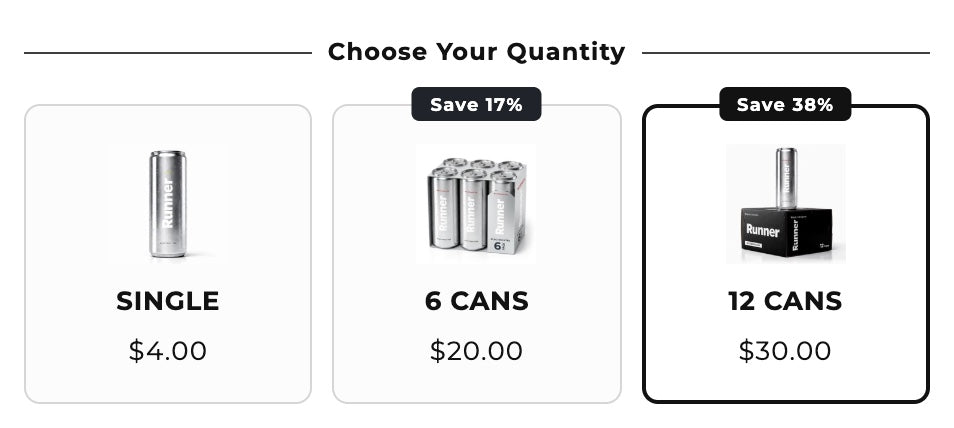
You: "Add quantity breaks to the Electrolyte Mix. 1 pack full price, 2 packs 10% off, 3 packs 15% off with a Most popular badge on 2."
- The assistant calls
get_storeto read your currency, language and plan. - It calls
search_productsfor "Electrolyte Mix" and gets the real product id. - It calls
create_bundlewith the quantity breaks template and your three deals. The bundle is saved in your store colors and language, switched off. - It calls
render_bundle_previewand shows you the widget on the product, as shoppers will see it. - You ask for changes in words: "Make the badge green" or "Say Save 15% on the third option". The assistant patches the bundle with
update_bundleand renders it again. - When you say "switch it on", it calls
set_bundle_status. Shoppers see the offer, and checkout applies the discount.
The same flow copies a design. Paste a screenshot of a bundle you like. The preview tool renders your bundle at the screenshot's width, side by side with it, and returns the size differences. The assistant patches what differs, up to five rounds. It asks first whether to copy the screenshot's colors or keep your store's own colors.
How does the assistant avoid breaking a live bundle?
The Section Store MCP server makes every change to a live bundle a two-step change with a picture in between. The first call saves nothing. It returns a picture of the bundle after the change, a list of what changes and a confirm token. The assistant shows you both. Only when you say yes does it call again with the token.
- The token expires. It lasts 15 minutes and matches one exact change. A different change needs a new picture.
- Bundles that are off save at once. Shoppers can't see them, so there is nothing to confirm.
-
Undo works for 30 days.
list_changesshows what each assistant changed and when.undo_changereverses one. It refuses when someone edited the bundle since, so nobody's work is lost. - No HTML. Text fields take plain text. Styling goes through the bundle's settings, with custom CSS only for the rest.
- Running tests are frozen. A bundle in a running A/B test can't change until the test ends.
Every live bundle is a Shopify automatic discount made by a Shopify Function. Checkout applies the price shoppers saw. Shopify allows 25 active automatic discounts per store, app discounts included. Each live bundle uses one of them.
Can the assistant A/B test a bundle?
An assistant can run a full bundle A/B test over MCP on Section Store Plus. It makes the test, builds version B, starts it, reads the results and publishes the winner. Version A is the bundle as it is. Version B starts as a copy, and the assistant changes it with update_bundle.
Starting and ending a test use the same two steps as a live change. Section Store calls a winner after 7 full days, 500 visitors and 20 paid orders per version. A test runs at most 90 days. We ran the first test through Claude on our demo store on October 23, 2026.
The server tells assistants to offer a test when you want a big change to a live bundle and aren't sure it will sell more. Ask "Test 2 packs at 15% against 2 packs at 10%" and the assistant sets it up.
How is this different from Shopify's own Claude connector?
Shopify's connector for Claude works on your catalog, orders and discount codes. Section Store's MCP server works on the bundle widget and the discount behind it. They do different jobs, and you can connect both. The table compares them with the one other bundle app we found that lists MCP.
| Connection | Bundle widget | Discounts | Live edits | Preview first | Price |
|---|---|---|---|---|---|
| Section Store | Yes, 6 templates | Percent, amount, fixed price, free gift | Yes, after you confirm | Yes | Free to build. Plus $15 a month to switch on |
| Shopify connector | No | Percentage-off codes only | No, unpublished themes only | No | Free with your Shopify plan |
| Rapid Bundles | Check terms | Check terms | Check terms | Check terms | "API and MCP" on Elite, $59 a month |
Shopify's help page for the Claude connector says it "creates percentage-off discount codes" and doesn't create fixed-amount discounts. It also says a connected AI tool can't edit your live theme. A code alone doesn't show shoppers a bundle on the product page. They have to know the code.
Rapid Bundles & Upsell lists "API and MCP" on its Elite plan at $59 a month, rated 5.0 from 1,581 reviews. Its listing doesn't publish the tool list, so we don't compare features we couldn't read.
What does the Section Store MCP server cost?
The Section Store MCP server costs nothing to connect, and assistants can build bundles on any plan. Switching a bundle on needs Section Store Plus at $15 a month, flat at any revenue, with a 14-day trial. Plus also switches on the cart drawer, A/B tests and AI Pages.
The assistant itself is billed by its maker. Check on its pricing page that your plan allows custom connectors. Section Store charges no fee per tool call.
If you already ask Claude or ChatGPT to plan your offers, connect it and let it build them too. You approve every live change from a picture, and you can undo any of them for 30 days.
What can't the assistant do yet?
The assistant can't do everything the bundle editor does. These parts stay in the app or aren't built:
- One-click import from another bundle app. The assistant rebuilds a design from a screenshot instead.
- Custom HTML. Assistants write settings and custom CSS only.
- Edits to a bundle while its A/B test runs.
- Free shipping inside a bundle. Free shipping comes from the cart drawer's reward bar.
- Several bundles on one product at once. The first matching bundle shows.
- More than 250 bundles per store created through assistants.
The same server runs the cart drawer. Our guide to building a Shopify cart drawer with Claude or ChatGPT covers the reward bar and upsells.
How we checked
We read the Section Store MCP server code on October 24, 2026 (version 1.6.0, 28 tools) and took every tool name and rule from it. Shopify's connector limits come from help.shopify.com on the same day. Rapid Bundles' plans come from its App Store listing that day. We make Section Store. Section Store is rated 4.9 from 2,900+ reviews on the Shopify App Store.
For a wider view of bundle apps, read our best Shopify bundle apps comparison, the quantity breaks apps guide and how to create bundles on Shopify in the app itself. Switching from Kaching? See Kaching Bundles alternatives.
Frequently asked questions
Is there a Shopify MCP server that creates bundles and quantity breaks?
Yes. Section Store's MCP server at https://mcp.section.store/mcp has dedicated bundle tools: create_bundle, update_bundle, render_bundle_preview and set_bundle_status. Claude, ChatGPT, Grok and Cursor can use them to build quantity breaks, buy X get Y and mix and match offers that checkout applies as a Shopify automatic discount.
Can ChatGPT create a Shopify bundle?
ChatGPT can create a Shopify bundle once you add Section Store as a custom MCP server with OAuth. Open chatgpt.com/plugins, choose Add custom MCP server, paste https://mcp.section.store/mcp and approve your store in the Section Store app. ChatGPT then builds the bundle switched off and shows you a preview.
Can Claude change my live bundle without asking?
No. A change to a live Section Store bundle takes two calls. The first saves nothing and returns a picture and a confirm token. Claude must show you the picture and send the token back after you say yes. The token expires after 15 minutes, and undo works for 30 days.
Does the Shopify connector for Claude make bundles?
No. Shopify's connector for Claude manages products, orders, customers and percentage-off discount codes. Its help page says it doesn't create fixed-amount discounts and can't edit your live theme. A bundle widget on the product page needs a bundle app, such as Section Store, connected over its own MCP server.
Do I need Section Store Plus to use the MCP server?
You need Plus only to switch bundles on. Any store can connect an assistant and build, preview and save bundles for free. Switching a bundle on, the cart drawer and A/B tests need Section Store Plus at $15 a month, flat at any revenue, after a 14-day trial.
Can the assistant copy a bundle from a screenshot?
Yes. Paste the screenshot and ask the assistant to match it. It builds the bundle, renders it side by side with your screenshot at the same width, and fixes what differs, up to five rounds. It asks first whether to copy the screenshot's colors or keep your store's colors.
Does an AI-made bundle count toward Shopify's discount limit?
Yes. Each live Section Store bundle is one Shopify automatic discount, and Shopify allows 25 active automatic discounts per store, app discounts included. Bundles that are off don't use a slot. Ask the assistant to list your bundles if you are close to the limit.
Which AI assistants work with the Section Store MCP server?
Claude, ChatGPT and Grok have connect steps in the Section Store app. Cursor, Claude Code and any client that supports remote MCP servers with OAuth work with the same URL. Each connection acts for one store, and you can disconnect it from the AI assistants page in the app.
Prices and features checked on October 24, 2026. We update this page when they change.


