

How to create bundles on Shopify (2026): 4 ways, with and without an app
Four ways to create bundles on Shopify, step by step: Shopify Bundles, a plain product, Shopify discounts and a bundle app. With each method's limits.


Short answer
Use Shopify's free Shopify Bundles app for fixed bundles and multipacks. Go to Apps → Bundles and click Create bundle. Pick the products and set the price. Without an app, create a bundle product and track its stock by hand. For quantity breaks, mix and match or buy X get Y in the buy box, use a bundle app.
- Shopify Bundles is free for fixed bundles and multipacks, with stock synced to the components.
- Shopify Bundles doesn't support mix and match, subscriptions or pre-orders.
- A plain bundle product needs no app, but its stock doesn't sync.
- Shopify's buy X get Y and minimum quantity discounts work in the cart, not on the product page.
- Bundle apps show quantity breaks and mix and match in the buy box.
A Shopify bundle sells two or more products, or several units of one product, at one price. There are four ways to create bundles on Shopify. Shopify's free Bundles app makes fixed packs and multipacks. A plain product works without any app. Shopify's own discounts can reward buying items together. A bundle app adds quantity breaks and mix and match to the product page. This guide shows each method step by step, with its limits, so you can pick the right one for your products. We make Section Store, the bundle app in method 4. Section Store is a Shopify app with theme sections, bundles, a cart drawer and AI Pages. Section Store Plus is its $15 monthly plan.
Which bundle method should you use?
Use Shopify Bundles for a fixed set or a multipack with its own product page. Use a bundle app for quantity breaks, mix and match or buy X get Y offers shown in the buy box. Use a plain product only for a one-off kit you'll restock by hand.
| Method | Cost | Best for | Main limit |
|---|---|---|---|
| Shopify Bundles app | Free | Fixed bundles and multipacks | No mix and match or subscriptions |
| A plain bundle product | Free | A one-off kit | Stock doesn't sync with the items inside |
| Shopify discounts | Free | "Buy one, get one 50% off" deals | The offer shows only in the cart |
| A bundle app | $0–299/mo | Quantity breaks, mix and match, BOGO | Most apps charge more as bundles sell |
How do you create a bundle with the Shopify Bundles app?
Install Shopify's free Shopify Bundles app, then build the bundle from products you already sell. These steps follow Shopify's help center.
- Create the products that go in the bundle, if they don't exist yet.
- In your Shopify admin, go to Apps → Bundles and click Create bundle.
- Enter a title and click Select products. Pick the items for the bundle.
- Set quantities. To make a multipack, duplicate a product or raise its quantity.
- Choose which variants to include. Turn on Combine options with matching names to let shoppers pick a size once for every item.
- Click Save and continue, then add the price, images and description.
- Set the status to Active and save. New bundles start as drafts.
What are the limits of Shopify Bundles?
Know the limits first. Per Shopify's help center, a fixed bundle holds up to 30 components, with up to 3 options and 100 variants. The Shopify Bundles app doesn't support mix-and-match bundles, and bundles don't work with subscriptions or pre-orders. The bundle price doesn't update when a component's price changes. Bundle stock follows the component with the lowest stock.
How do you create Shopify bundles without an app?
You can create Shopify bundles without an app in two ways: a bundle product, or Shopify's own discounts. Both are free on every Shopify plan. A bundle product is a new item that stands for the set, and you keep its stock by hand. A discount lowers the price in the cart, but the product page doesn't show the deal.
To make a bundle product:
- Go to Products → Add product and name it, for example "Shampoo and conditioner set".
- Set the bundle price and a compare-at price to show the saving.
- List what's inside in the description and add a photo of the set.
- Track its stock as its own item, and lower the single products' stock by hand when bundles sell.
This works for a gift set you pack ahead. For anything that sells every day, the stock gets out of sync fast. Shopify Bundles or an app fixes that.
Can you bundle with Shopify's own discounts?
Shopify's own discounts can bundle products for deals that need no special product page. They apply in the cart.
- Buy X get Y. Create a buy X get Y discount, for example "buy a shampoo, get a conditioner 50% off". Make it automatic so shoppers don't need a code.
- Buy more, save more. Create an amount off products discount with a minimum quantity of items. Make one discount per tier. If tiers can't combine, Shopify applies the best one.
Two catches. The product page doesn't show the deal, so you need to explain it in the description or a banner. Each automatic discount also uses one of Shopify's 25 active automatic discount slots, shared with your apps. On plans below Shopify Plus, products in a buy X get Y discount can't get further product discounts.
How do you create bundles with a bundle app?
A bundle app shows the offer in the buy box: tiers to pick, a mix-and-match picker or a "buy 2, get 1 free" choice. Here's how it works in Section Store. Other apps follow similar steps.
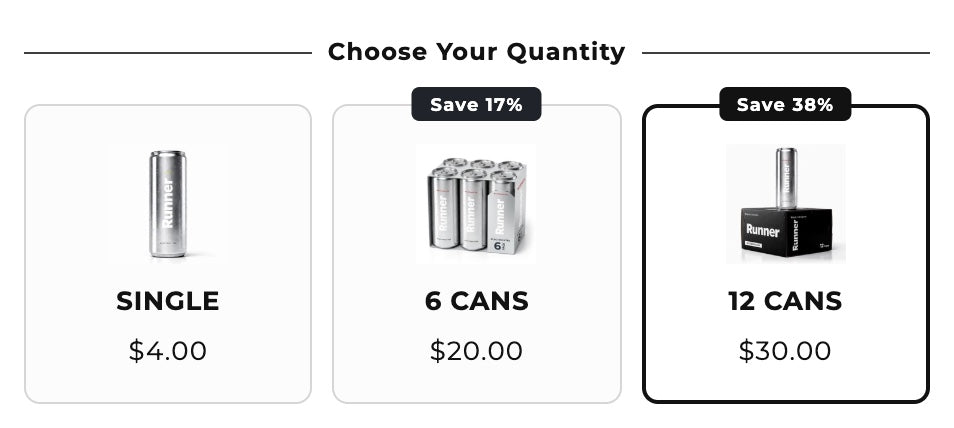
- In the Section Store app, open Bundles and click Add Bundle. Pick a preset or start from scratch. The presets are "Quantity breaks for the same product", "Buy X, get Y (BXGY) deal", "Quantity breaks for different products", "Complete the bundle", "Subscription" and "Choose your quantity".
- Or describe it. Type something like "Create a Buy 2 Get 3 offer for @Product with 15% off", or attach a screenshot of a bundle you like.
- Pick the products. Apply the offer to all products, chosen products or collections.
- Set the tiers and discounts. Use a percentage, an amount off or a fixed price. You can add free gifts or checkbox add-ons too.
- Design it. Choose a layout, colors and badges like "Most popular".
- Click Publish. The discount is created as a native Shopify discount, so the checkout price matches the cart.
- Add the Bundle block to your product page in the theme editor, then test a checkout.
Drafts are free. Publishing needs Section Store Plus at $15 a month, which also includes a cart drawer and AI Pages. The Subscription preset needs a subscription app for the subscribe option.
Which bundle types can you offer?
| Bundle type | Example | How to build it |
|---|---|---|
| Fixed bundle | Skincare set of 3 products | Shopify Bundles or an app |
| Multipack | 6 cans of one drink | Shopify Bundles or quantity breaks |
| Quantity breaks | Buy 2 save 10%, buy 3 save 20% | A bundle app |
| Mix and match | Any 3 flavors for $30 | A bundle app |
| Buy X get Y | Buy 2, get 1 free | Shopify discounts or an app |
| Complete the bundle | Jacket plus matching scarf | A bundle app |
How should you price a bundle?
- Start from your margin. Work out the lowest bundle price that still pays for the products, packing and shipping.
- Make the saving easy to see. Show the "was" price or a "Save 20%" badge.
- Give each step a reason. Make the saving grow with each tier, so the bigger option feels like the deal.
- Bundle what people already buy together. Check your orders for products that often share a cart.
- Test one change at a time. Compare paid orders, not clicks, before you keep a new price.
Which bundle app should you use?
It depends on the offer and your size. Bundler has the best free plan for quantity breaks. Simple Bundles is best for kits with component SKUs, at $14 to $349 a month by Shopify plan and orders. Section Store Plus is $15 a month at any revenue, with a cart drawer included. Compare them all in our best Shopify bundle apps guide, or see the best quantity breaks apps if you only need tiers. For two-for-one deals, see how to set up BOGO on Shopify.
Frequently asked questions
How do I create a bundle on Shopify for free?
Use Shopify's free Shopify Bundles app for fixed bundles and multipacks. Go to Apps → Bundles, click Create bundle, pick the products and set the price. Bundler's free plan adds quantity breaks if you need them.
How do I create bundles on Shopify without an app?
Create a new product for the bundle, set its price and track its stock yourself. Stock won't sync with the products inside it. For deals in the cart, you can also use Shopify's buy X get Y or minimum quantity discounts.
Can Shopify Bundles do mix and match?
Shopify Bundles can't do mix and match. Shopify's help center says the Shopify Bundles app doesn't support mix-and-match bundles. Use a third-party bundle app, or Shopify's Bundles APIs on the Shopify Plus plan.
Do Shopify bundles work with subscriptions?
The Shopify Bundles app doesn't work with subscriptions. Shopify says bundles aren't compatible with purchase options like subscriptions and pre-orders. Some bundle apps work with subscription apps, so check before you install.
How does inventory work for Shopify bundles?
With Shopify Bundles, the bundle's stock is set by the component with the lowest stock, and it updates in real time. A plain bundle product has its own stock that doesn't sync. Discount-based bundle apps sell the real products, so their stock stays accurate.
Can I bundle products with variants?
You can bundle products with variants. Shopify Bundles allows up to 3 options and 100 variants per bundle. Shoppers pick a variant for each item, or once for all items when you combine matching options.
What is the best bundle app for Shopify?
Bundler for a free plan, Simple Bundles for kits and stock, Kaching for the most reviews, and Section Store Plus for a flat $15 with a cart drawer included. See our full comparison of 10 bundle apps.
Prices and features checked on October 8, 2026. We update this page when they change.


