

The Shopify MCP server for bundles and cart drawers.
Ask Claude or ChatGPT for a bundle or a cart. It builds it in your store. Nothing goes live without your yes.
https://mcp.section.store/mcpBuilding is free. Plus takes it live for $15 a month.
4.9★ from 3,000+ reviews • In Claude's and ChatGPT's directories
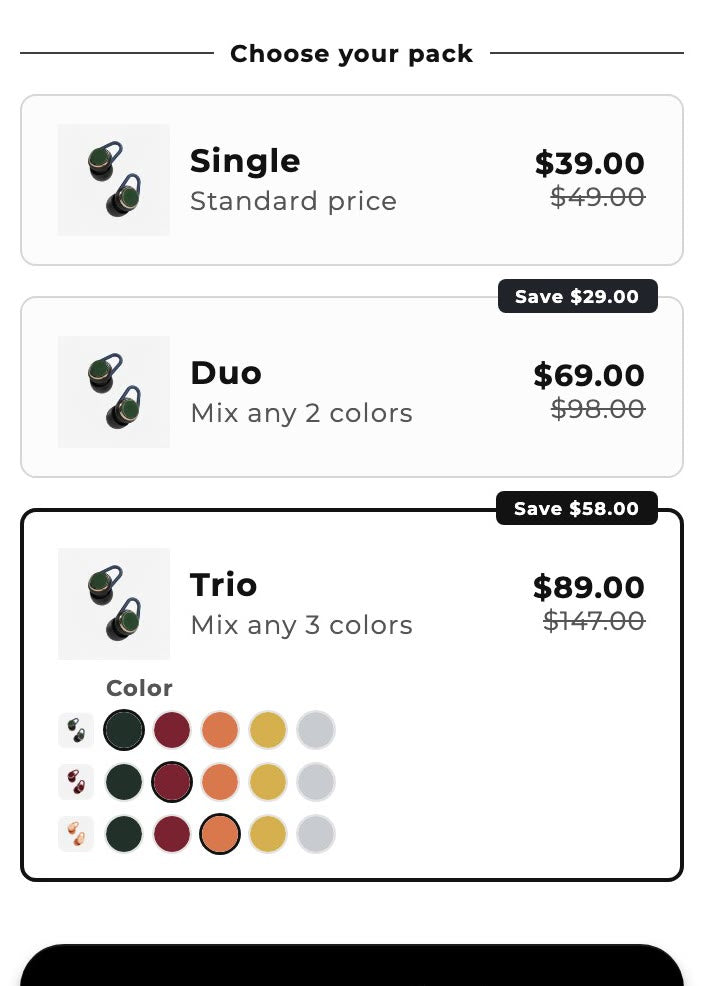
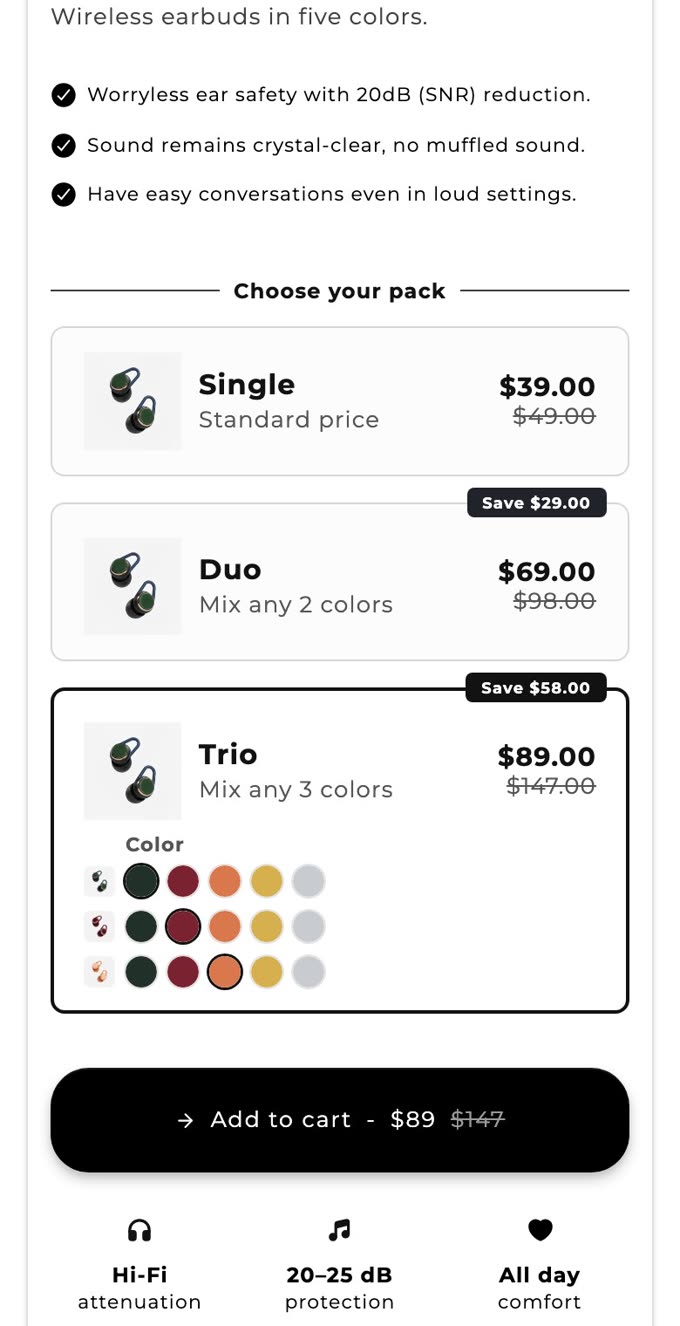
Add a quantity break to EchoHEARS: 2 for $69 and 3 for $89.
search_productscreate_bundleshow_bundleYour quantity break is ready. It's off, so shoppers can't see it yet.
Should I switch it on?
Ask in a chat. It builds in your store.
Bundles
“Make a 3-tier bundle for my best seller.”
Quantity breaks, mix and match, free gifts.
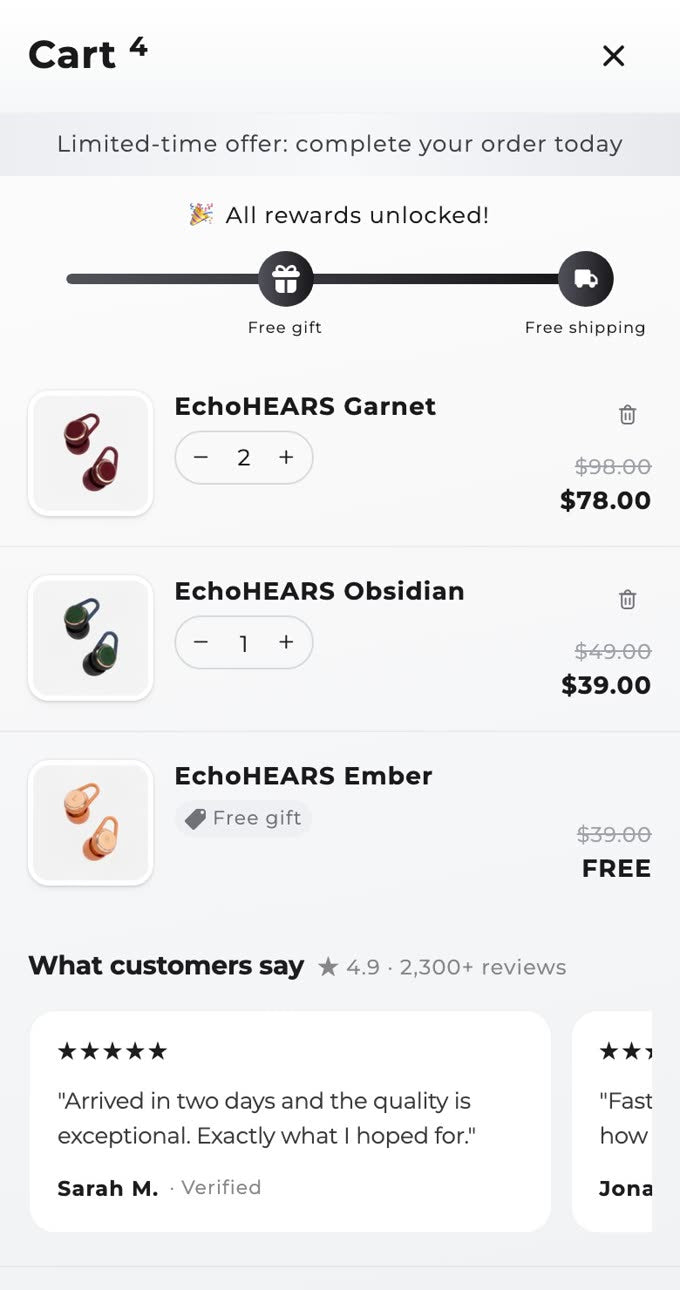
Cart drawer
“Copy this cart, but in my colors.”
Reward bar, upsells and gifts.
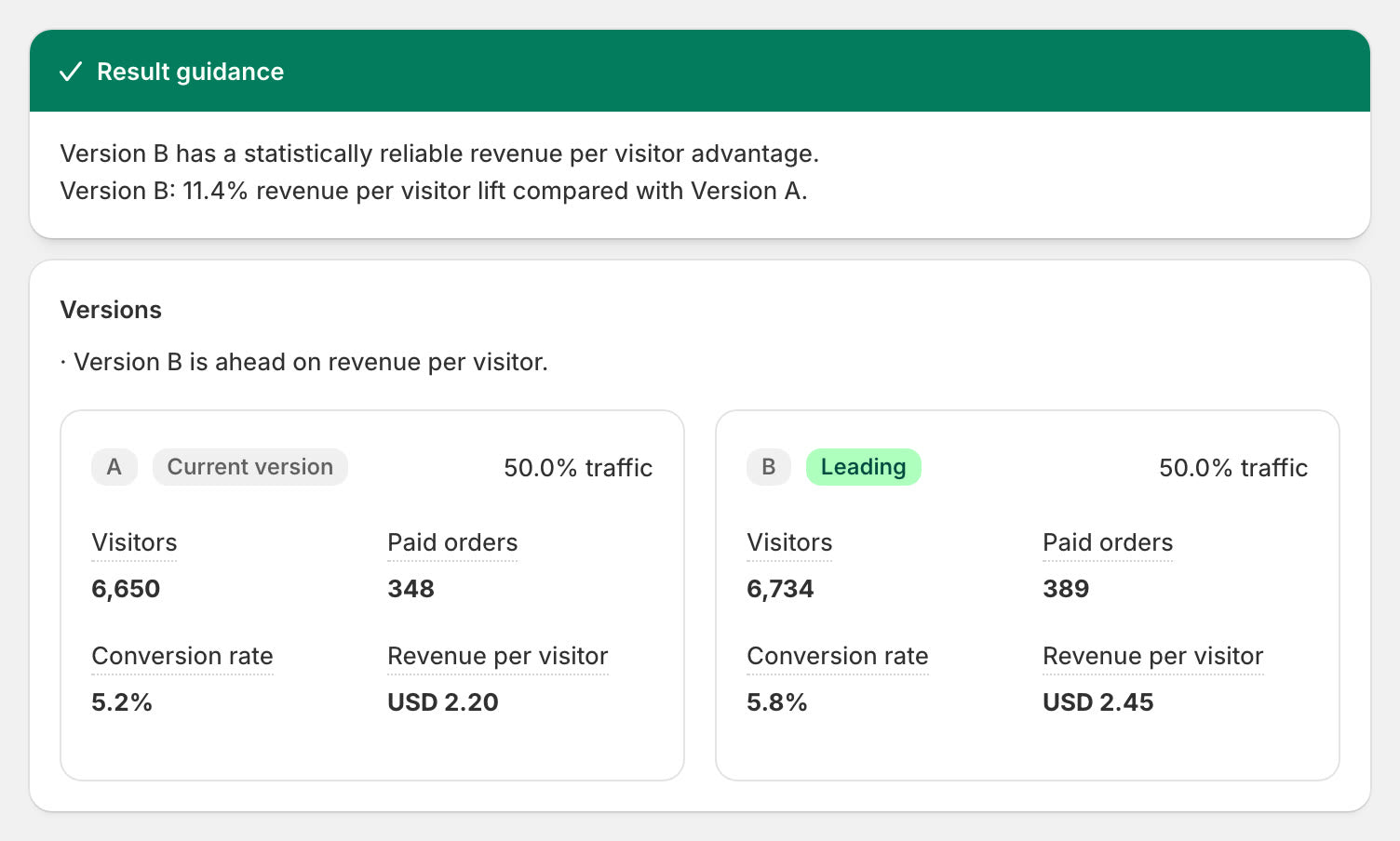
A/B tests
“Test a bigger discount on Duo.”
It runs the test and calls the winner on revenue per visitor.
Nothing goes live without your yes.
Connect in a minute.
Real reviews from real stores.
“…all of the cart edits are super useful and really helps drive AOV and CVR! Best app for the price tag!”
“Now I can migrate all my bundles to this app.”
“So much more value for the amount spend it is incredible.”
Full guide: servers, tools and FAQ
Section Store MCP is a remote MCP server for Shopify stores. Claude, ChatGPT, Grok and Cursor use it to build bundles, cart drawers and A/B tests from a chat. You add it once and approve it in your Shopify admin. Building is free. One plan, Section Store Plus, takes it all live for $15 a month, flat.
Which Shopify MCP server do you need?
It depends on the job. Developers use the Dev MCP. Shopping agents use Storefront MCP. Merchants use Shopify's connector for store data. Shopify's servers have no bundle or cart drawer tools. Section Store's server adds them and runs next to Shopify's, so your assistant can build what shoppers see.
| Server | Built for | What it does | Bundles and cart drawer |
|---|---|---|---|
| Section Store MCP | Merchants | Builds and changes bundles, the cart drawer, reward tiers and A/B tests. | Yes |
| Shopify connector for Claude | Merchants | Manages products and inventory. Reads orders and customers. Creates percentage-off codes. | No |
| Shopify AI Toolkit and Dev MCP | Developers | Gives coding tools Shopify's docs, API schemas and CLI store management. | No |
| Storefront MCP, now Catalog and Cart MCP | Shopping agents | Searches a store's catalog and fills a shopper's cart at /api/ucp/mcp. | No |
| Community Admin API servers | Developers | Run on your own setup with Admin API credentials. Shopify doesn't make them. | No |
From Shopify's help center and developer docs, read 6 November 2026. Section Store is an independent app. Shopify doesn't make it.
What can you ask your assistant to build?
Ask in plain words. Your assistant builds in your store's colors and language, then shows you the result. Hundreds of stores have connected. Their assistants have made thousands of tool calls.

Bundles
- "Add a quantity break to my hoodie: buy 2 and save 10%, buy 3 and save 15%."
- "Build a mix and match bundle from my candles collection."
- "Copy the bundle on this page, in my store's colors."

Cart drawer
- "Build a cart drawer with free shipping at $50 and a free gift at $100."
- "Match my cart to this screenshot."
- "Add a product upsell and trust badges."
A/B tests
- "Test a 15% top tier against my 10% one."
- "Test a new reward bar against my live cart."
- "How is my test doing?"
How do you connect Claude, ChatGPT or Cursor to Shopify?
Install Section Store, add it to your assistant and approve it in your Shopify admin. Claude and ChatGPT need no URL.
On Claude? Add Section Store from its directory.
Claude's connector directory lists our own connector. Click Connect and approve it in your Shopify admin.
On ChatGPT? Add Section Store from its directory.
ChatGPT's plugin directory lists our own plugin. Click Install Plugin and approve it in your Shopify admin.
- Install Section StoreInstall the app from the Shopify App Store. It's free.
- Add the serverAdd Section Store in your assistant.
- Approve itYour assistant opens a sign-in page. Enter your store, then click Connect in Section Store.
| Assistant | Where to add it |
|---|---|
| Claude | Open Section Store in Claude's directory and click Connect. |
| ChatGPT | Open Section Store in ChatGPT's plugin directory and click Install Plugin. By hand, open chatgpt.com/plugins, click the plus button and choose Add custom MCP server. Paste the URL and pick OAuth. |
| Grok | Open grok.com/connectors. Click New Connector, then Custom, and paste the URL. |
| Claude Code | Run this command, then sign in from /mcp.claude mcp add --transport http section-store https://mcp.section.store/mcp
|
| Cursor and others | Add a remote MCP server with the URL https://mcp.section.store/mcp. |
Watch Claude build a cart from a screenshot
Can an assistant break your store?
Assistants make mistakes, so we built limits into the server. A live edit shows you a picture before it saves. You get 30 days to undo it.
New work starts off
New bundles and carts stay hidden from shoppers. Only a Plus store's first cart goes live.
Live edits take two steps
The first call saves nothing. You get a picture and a list of changes. The assistant saves once you agree.
Rewards need your word
We tell assistants to confirm each threshold and discount with you before checkout prices change.
Undo lasts 30 days
Ask what changed and your assistant lists it. It reverses changes newest first. A started A/B test can't be undone.
Which Shopify apps work with Claude?
At least nine Shopify apps work with Claude, including Kaching Bundles, Vitals and StoreSEO. Section Store is the only one we found that builds bundles, a cart drawer and A/B tests through one connector. Kaching and Rapid each sell bundles and carts as two apps. Section Store Plus covers both, with A/B tests and AI Pages, for $15 a month at any revenue. Our Claude guide lists all nine.
| App | What an assistant can do | Price a month |
|---|---|---|
| Section Store | Build and change bundles, the cart drawer and A/B tests. | Free to build. $15 flat to go live. Plus also includes AI Pages and the Plus sections. |
| Kaching Bundles | Read, create and edit bundle deals. A/B-tested deals stay in its editor. | From $14.99, up to $1,000 of added revenue. Its cart drawer is a second app, from $9.99. |
| Rapid Bundles and Rapid Cart | Both listings name MCP but not Claude. | $68 for both: $59 for Rapid Bundles Elite and $9 for Rapid Cart Starter. |
From Shopify App Store listings and Kaching's changelog, checked November 2026. Monthly billing in USD. We make Section Store.
Which tools does the Section Store MCP server have?
The server has 29 tools. They cover bundles, the cart drawer, previews, A/B tests and undo.
| Area | What the assistant does | Tools |
|---|---|---|
| Bundles | Builds and edits quantity breaks, buy X get Y, mix and match, complete the bundle, subscription and quantity picker bundles. |
list_bundles get_bundle create_bundle update_bundle set_bundle_status duplicate_bundle delete_bundle
|
| Cart drawer | Builds and edits the cart: reward tiers, upsells, trust badges and the look. |
list_carts get_cart create_cart update_cart set_cart_status duplicate_cart delete_cart
|
| Previews | Draws a picture of a bundle or cart. show_bundle opens a live bundle card in chats that show cards. Other chats get a preview link. |
render_bundle_preview render_cart_preview show_bundle
|
| A/B tests | Tests 2 to 4 versions of a live bundle or cart and reads the results. Needs Plus. |
list_ab_tests get_ab_test create_ab_test update_ab_test start_ab_test end_ab_test delete_ab_test
|
| Undo | Lists the assistant's changes and reverses one, for 30 days. |
list_changes undo_change
|
| Store and help | Reads your plan and setup. Searches Section Store's help articles. |
get_store search_docs
|
| Products | Finds product, variant and collection ids. It only reads. | search_products |
Frequently asked questions
What is an MCP server?
MCP stands for Model Context Protocol. It's an open standard that lets an AI assistant use tools in another app. An MCP server hands the assistant those tools.
Is there a Shopify MCP server for bundles?
Yes. Section Store MCP builds quantity breaks, buy X get Y and mix and match bundles from a chat. It builds the cart drawer too.
Is this Shopify's official MCP server?
No. Section Store is an independent app with Shopify's Built for Shopify badge, and we run this server. Claude's connector directory and ChatGPT's plugin directory both list it. It's also in the official MCP Registry as store.section/section-store.
Which AI assistants work with Section Store?
Claude, ChatGPT, Grok, Cursor and Claude Code. Any MCP client that can add a remote server with OAuth can connect.
Do I need to write code?
No. You describe what you want in a chat. The assistant uses the same settings as the app's editor, so you can keep editing there.
Do I need Section Store Plus?
Not to build. Assistants build bundles and carts on any plan. Switching them on and running A/B tests need Plus, $15 a month, flat, with a 14-day free trial.
Can the assistant change my live store without asking?
Edits to a live bundle or cart come back first as a picture and a list of changes. Nothing saves until you agree. Starting and ending an A/B test work the same way. Switching a bundle or cart on takes one step, so we tell assistants to ask you first.
Can I undo what the assistant did?
Yes, for 30 days. Ask it to list its changes and undo one. A deleted bundle or cart comes back switched off. Undo stops if someone edited the item after the assistant did.
Why can't shoppers see my new cart?
Switch on the Cart drawer app embed once in your theme editor. Your assistant checks this and sends you the link when it's off.
Can the assistant build AI Pages or edit my products?
Not yet. The connector covers bundles, the cart drawer and A/B tests. It reads products but doesn't change them. Build AI Pages in the app.
Is it safe to connect?
You approve each connection inside Section Store, in your own Shopify admin. The assistant's token works for your store only and lasts one hour before it refreshes. It can't see customer or payment data.
How do I disconnect an assistant?
Open Build with AI in the app and click Manage. Then click Disconnect next to the assistant.