
Section Store Plus • Conversion blocks
Give shoppers a reason to buy.
Shoppers decide right next to Add to cart. These small blocks put proof, answers and a nudge in that spot.
4.9★ from 3,000+ reviews • Included with Plus, $15 a month


Every reason to buy, right on your product page.
Each block does one job. Add the ones you need and leave the rest out.
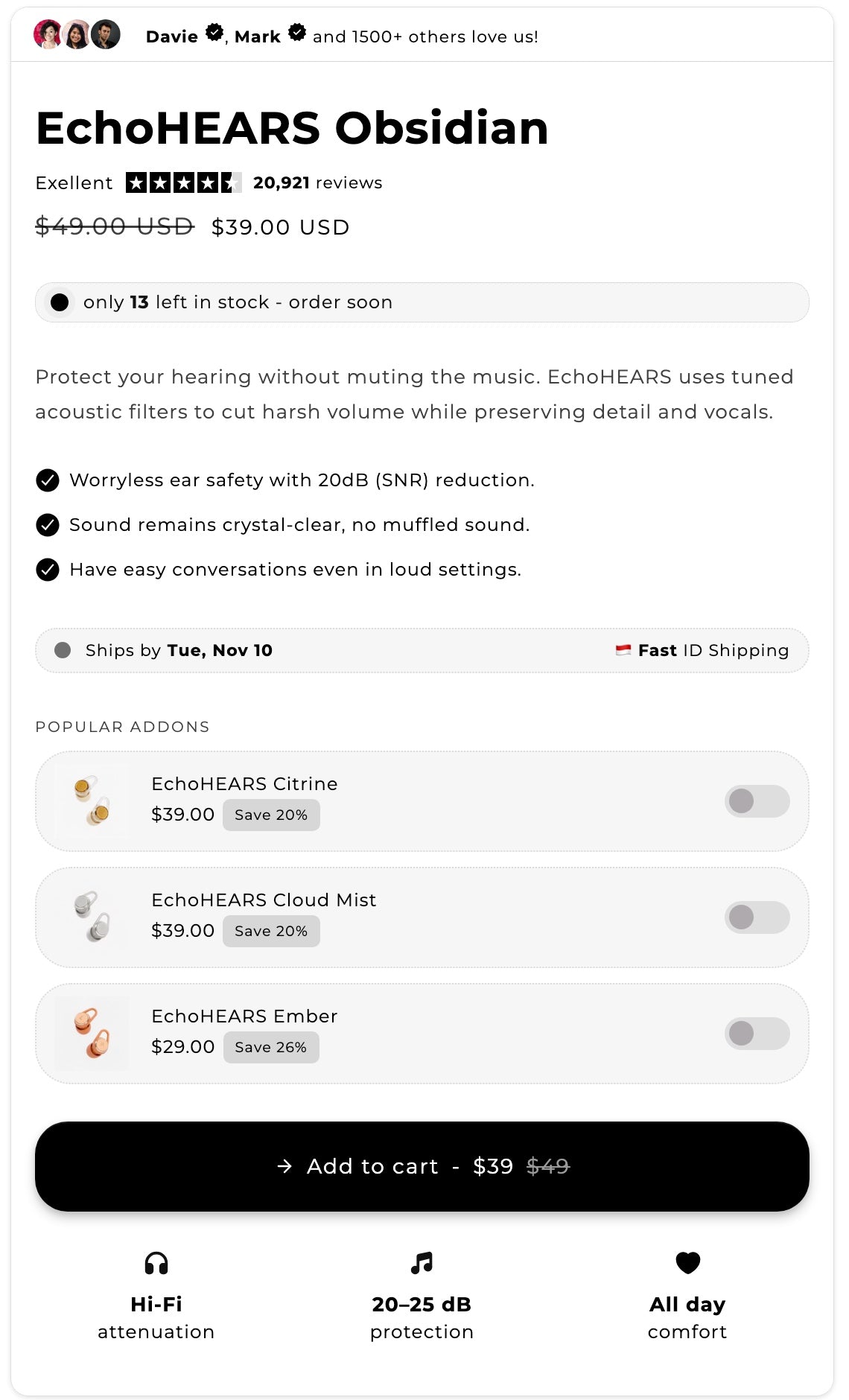
One buy box, built from blocks
This whole buy box is Section Store blocks, sitting in a normal Shopify theme.
Social proof
People trust other people. Show who bought it and what they rated it.
Benefits list
Three clear reasons, placed where shoppers decide.
Product add-ons
Shoppers switch on an extra without leaving the page.
Shipping and features
Answer "when does it arrive?" before anyone asks.

Let AI set up your buy box.
AI Pages picks the blocks and writes them for your product. The rest of the page stays as it is, and nothing goes live until you assign it.

 Runner Hydration · $30.00Add to cart
More blocks for every corner of the page.
Sticky add to cartThe button stays in view as shoppers scroll.
UpsellSuggest a second product before they leave the page.
Video carouselLet people watch it in use.
CommentsLet past buyers do the selling.
Countdown timerCounts down to a real sale end.
Coupon codeOne tap copies the code.
Payment iconsCards, wallets and Klarna in one neat row.
TabsFold details into tidy tabs.
Add to cart styleMatch the button to your brand.
BadgesFlag what's new, low or on sale.
Pulse badgeA live dot that can show stock level.
Benefit boxesYour best points, boxed up and easy to scan.
Live in three steps.
1Install Section StoreIt's free on the Shopify App Store.
2Start your 14-day trialPlus includes every conversion block.
3Add your blocksDrop them in with the theme editor. Or let AI Pages build the buy box for you.
Real reviews from real stores.
“The conversion blocks have been a game changer for our store.”
“Love all the conversion blocks for my product pages.”
“Great conversion focused add-ons for shopify shops!”
Full feature list and FAQ
Section Store's conversion blocks are small app blocks for your Shopify product page. They add social proof, benefits, shipping info, add-ons, badges and a sticky add to cart button next to your buy box. Every block comes with Section Store Plus, $15 a month, flat.
What do the conversion blocks do?
Each block does one job. Add the ones you need and leave the rest out.
| Block | What it does |
|---|---|
| Social proof | Shows who already bought and what they rated it. |
| Benefits list | Puts your best reasons to buy next to the price. |
| Product add-ons | Lets shoppers switch on an extra without leaving the page. |
| Shipping and features | Answers "when does it arrive?" before anyone asks. |
| Sticky add to cart | Keeps the button in view as shoppers scroll. |
| Upsell | Suggests a second product on the page. |
| Video carousel | Shows the product in use. |
| Comments | Shows what past buyers say. |
| Countdown timer | Counts down to a real sale end. |
| Coupon code | Shows a code shoppers can copy. |
| Payment icons | Shows the ways to pay. |
| Tabs | Folds product details into tabs. |
| Add to cart style | Matches the button to your brand. |
| Badges | Labels a product with a small badge. |
| Pulse badge | Adds a live dot that can show stock level. |
| Benefit boxes | Shows your best points in boxes. |
How do you add conversion blocks?
Blocks go live in three steps.
- Install Section StoreInstall the app free from the Shopify App Store.
- Start your 14-day trialPlus includes every conversion block.
- Add your blocksDrop them in with the theme editor, or let AI Pages build the buy box for you.
Frequently asked questions
What are conversion blocks?
They are small blocks for your Shopify product page. Each one adds a reason to buy next to Add to cart, such as reviews, shipping dates or an add-on.
Are conversion blocks included in Section Store Plus?
Yes. Plus includes every conversion block for $15 a month, flat. The free plan doesn't include them.
Do conversion blocks work with my theme?
They work where your product section accepts app blocks. A few product sections can't take them. We tell you when that happens, so you can choose another product template.
Can AI set up the blocks for me?
Yes. AI Pages picks the blocks and writes them for your product. The rest of the page stays as it is, and nothing goes live until you assign it.
What happens to the blocks if I cancel Plus?
Plus keeps working until the paid period ends. Then the conversion blocks stop showing on your store.