
How to show automatic discounts on Shopify product pages
Shopify applies automatic discounts in the cart, so your product page keeps the full price. Here is what each fix does and costs. Checked November 5, 2026.


Short answer
Shopify can't show an automatic discount on the product page by itself, because it applies the discount in the cart and at checkout. Use a compare-at price for a plain markdown, a display app to keep a discount you already made, or Section Store Plus for quantity breaks, bundles and buy X get Y offers shown with crossed-out prices.
- Liquid's product and variant objects have 0 discount fields, read in Shopify's docs on November 5, 2026.
- A compare-at price is a separate sale price. Leave a 20% automatic discount on and a $20 item marked to $16 sells for $12.80.
- Custom apps with Shopify Functions need Shopify Plus, from $2,300 a month. App Store apps with Functions work on any plan.
- Shopify allows 25 active automatic discounts per store, and app discounts count toward that limit.
- Section Store Plus shows offers above Add to cart and backs each one with a real Shopify automatic discount for $15 a month, flat.
Shopify can't show an automatic discount on the product page by itself. It applies the discount in the cart and at checkout, so the page keeps the full price. To show the saving, use a compare-at price, a theme edit, a display app or an offer widget such as Section Store Plus.
We make Section Store, a Shopify app with bundles, quantity breaks, a cart drawer, AI Pages and theme sections. Section Store Plus is its plan at $15 a month, flat.
Why doesn't my automatic discount show on the product page?
An automatic discount doesn't show on the product page because Shopify works it out from the cart. Shopify's discounts FAQ says discounts are "applied in a customer's cart and at checkout". Your discount isn't broken. Add the product to a cart to see it.
Many discounts depend on the cart, such as a minimum spend or a second item. A product page has no cart to test. Shopify's sale pricing page says crossed-out savings there take a third-party app or a Shopify Partner's custom work.
The code agrees. In Dawn 16.1.1 and Horizon 4.4.0, the price snippets print the price and compare-at price. Discount objects appear only in cart files. Shopify's changelog shows no 2026 change to this.
Where does each Shopify discount show up?
A saving reaches all four stops only when the offer is built into the product page. Automatic discounts miss the first stop, and compare-at prices fade out after it.
Automatic discountMade in Shopify admin
Discount codeTyped by the shopper
Compare-at priceA sale price on the product
Section Store offerA real automatic discount
Shopper sees the savingDepends on the themeShopper doesn't see it
Sources: Shopify's docs, Dawn 16.1.1 and Horizon 4.4.0. Checked November 5, 2026.
How do I show a discount on a product page in Shopify?
To show a discount on a Shopify product page, match the route to the deal. A plain markdown suits a compare-at price. A discount you want to keep suits a display app. An offer that rewards buying more suits Section Store Plus, because a tiered deal has no single price to print.
| Route | Shoppers see | Follows the real discount? | Cost a month | Pick it for |
|---|---|---|---|---|
| Compare-at price | A crossed-out price and sale badge, on collection pages too | Separate price | $0 | One plain markdown |
| Text or badge in the theme | A line you typed | No, static | $0 | A short sale |
| Liquid by hand | A calculated price line | No, a hand copy | $0, plus theme edits | One percent on tagged products |
| Function plus custom app | Whatever you build | If you build it | Developer fees, and Shopify Plus from $2,300 | Rules no app covers |
| Display app | A crossed-out price from your admin discount | Yes, simple discounts | Free plans, then from $9.99 | A discount you already made |
| Section Store Plus | Offer tiers with crossed-out totals and per-unit prices | Yes, one setup | $15, flat | Quantity breaks, bundles, buy X get Y |
How does a compare-at price work with an automatic discount?
A compare-at price is a real sale price, not an automatic discount, and the two can stack. Put the new amount in Price and the old one in Compare-at price. Your theme crosses out the old price, on collection pages too. At checkout, Shopify shows only the sale price.
Shopify's Launchpad guide says a discount code comes off the sale price. Merchants report the same with store-wide automatic discounts. Run both and shoppers can get a double discount.
Example, with made-up numbers. A candle costs $20. You run a 20% automatic discount, and you also mark the Price down to $16 so the page shows it. The cart takes 20% off $16 and charges $12.80. The shopper gets 36% off, not 20%. Turn the automatic discount off, or leave those products out of it.
You also edit each product, then change it all back when the sale ends. In the EU, a markdown must show the lowest price of the past 30 days or more.
Can I show a discount with text or a badge?
Yes, a text line is the fastest way to show a discount, and it's static. In the theme editor, add a Text block under the price and write "20% off in your cart". Dawn and Horizon both have this block. Nothing links it to your discount, so remove it when the sale ends.
Can Liquid show an automatic discount?
No, Liquid can't read an automatic discount on a product page. Shopify's product and variant objects have price and compare-at fields and no discount field. Discount data sits on the cart, its line items and the order. So Liquid sees a discount only once the item is in the cart.
Liquid can repeat the math. The snippet below reads nothing from your discount. You type the percent and tag the products. Paste it into sections/main-product.liquid in Dawn, inside <div id="price-{{ section.id }}", right after the render 'price' tag. Dawn redraws that div when the shopper picks a variant.
Hand copy of a 20% discount. Not a live read.
{%- assign percent_off = 20 -%}
{%- if product.tags contains 'sale-20' -%}
  {%- assign variant = product.selected_or_first_available_variant -%}
  {%- assign cents_off = variant.price | times: percent_off | divided_by: 100.0 | round -%}
  {%- assign sale_price = variant.price | minus: cents_off -%}
  <p class="discount-note">{{ sale_price | money }} in your cart ({{ percent_off }}% off)</p>
{%- endif -%}
We ran it through a Liquid engine: $20.00 gives $16.00, $19.99 gives $15.99, and an untagged product prints nothing. We didn't run it on a live store, so check a real cart first. The note ignores minimum spends and quantities, and it keeps printing after the sale ends.
A developer could build a throwaway cart with the Storefront API and read the discount on each line. We haven't built that route.
Can a Shopify Function show a discount on the product page?
No, a Shopify Function can't show anything on the product page by itself. A discount Function calculates the discount in the cart and at checkout. The page needs a second part, such as a theme block that prints the offer.
Shopify's rules let only Shopify Plus stores use custom apps with Function APIs, and Plus starts at $2,300 a month. Public App Store apps with Functions work on any plan, so an app is the cheaper way to get one.
Which apps show automatic discounts on product pages?
Display apps read the automatic discounts you made in Shopify admin and print crossed-out prices on your pages. They suit a plain percent or amount off. Three of these four launched in 2026, so test on a duplicate theme first. Details are from the App Store on November 5, 2026.
- StrikeRight Sale Price covers product, collection and search pages for $9.99 a month. It has 1 review.
- Discount Display has a free plan with 1 active sale. It has 1 review.
- WasNow Discount Display is free up to 25 products, then $9.99 a month. It has no reviews yet.
- Adsgun is rated 4.4 from 27 reviews. It's free for your first promotion, and paid plans add a share of the revenue it generates.
WasNow's listing shows this route's limit. Offers that depend on the cart appear as badges, because "buy 3, save 15%" has no single price. See also our Shopify discount apps guide and quantity break apps.
How does Section Store Plus show an offer on the product page?
Section Store Plus shows the offer right above Add to cart, with crossed-out and per-unit prices. You build a quantity break, bundle or buy X get Y in the app. Section Store creates a real Shopify automatic discount behind it, so the page, cart and checkout agree.
Before: Shopify alone
Linen candle
$20.00
The store runs 10% off 2 and 15% off 3. Nothing here says so.
Add to cartAfter: Section Store offer
Linen candle
$20.00
Add to cartBuy 2: the page says $36.00, the cart says $36.00 and checkout says $36.00. The shopper saves $4.00.
Illustration with an invented product and example numbers. The real offer takes your store's look.
Section Store doesn't read a discount you made in Shopify admin. Create the offer in Section Store, then turn off any admin discount that does the same job:
- In Section Store, open Bundles and click Add Bundle.
- Choose Quantity breaks for the same product or Buy X, get Y (BXGY) deal. See quantity discount examples for tiers that work, or the Shopify BOGO guide for free items.
- Set the tiers, such as 10% off 2 and 15% off 3. For sets of different products, see how to create bundles.
- Turn on Show prices per item.
- Click Publish. If Section Store asks, click Turn on, then Save in the theme editor.
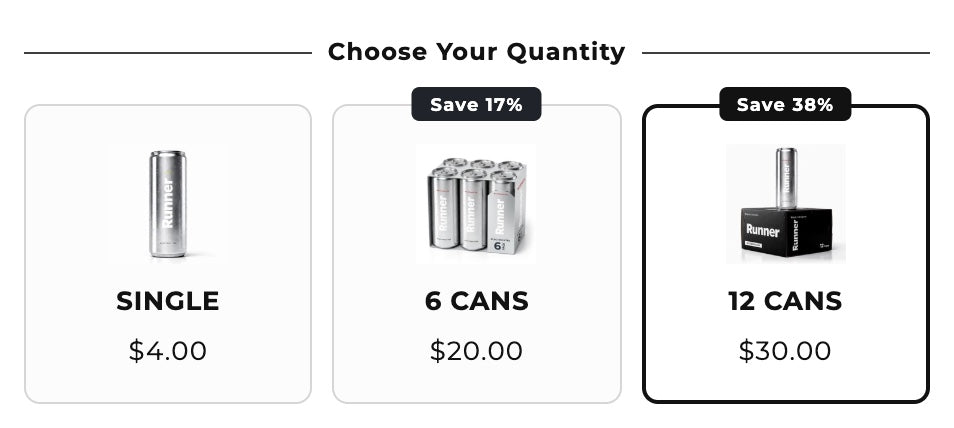
Drafts are free. Publishing needs Plus, with a 14-day free trial. Two limits matter:
- 25 slots. Each live bundle uses one of Shopify's 25 active automatic discounts, shared with your other apps.
- Product pages only. The offer doesn't appear on collection cards, and your theme's own price line stays at full price.
Section Store Plus is the pick for most stores. Shoppers see the deal before they add to cart, and the discount behind it is real. One $15 plan covers bundles, quantity breaks, the cart drawer, A/B tests and AI Pages, which rivals bill as separate apps. There's no revenue share.
Skip it if you want one percent on every collection card. Use a compare-at price or a display app.
How we checked
On November 5, 2026, we read Shopify's help pages, developer docs and changelog, plus the price and cart code in Dawn and Horizon. Shopify's discount pages don't say how an automatic discount treats a sale price, so we cite the Launchpad rule and merchant reports. We didn't install the display apps. Section Store facts come from its code.
Frequently asked questions
How do I show discounted prices on Shopify?
Set a compare-at price for a plain sale. A display app shows an automatic discount you already made. Section Store Plus shows quantity breaks, bundles and buy X get Y offers. Dawn and Horizon don't show automatic discounts until the cart.
Can Shopify show automatic discounts on collection pages?
Not by itself. Compare-at prices show on collection pages, and display apps such as StrikeRight Sale Price add crossed-out prices. Section Store's offers appear on product pages only, so they won't change the price on a collection card.
Why isn't the compare-at price showing on my store?
The compare-at price must be higher than the price, and your theme controls where it appears. On a collection page, Shopify won't mark a product as on sale if its variants have mixed compare-at prices. Check the variant first, then your theme settings.
Can I show a discount code on the product page?
Yes, as text. Liquid can't read your codes on a product page, so type the code into a Text block in the theme editor. The saving appears only after the shopper enters it. Remove the line when the code expires.
Does Section Store show discounts I made in Shopify admin?
No. Section Store Plus shows offers you create in Section Store, and it makes a Shopify automatic discount for each one. To show an admin discount, use a display app. To move a deal over, rebuild it as a bundle and turn the old one off.
How many automatic discounts can a Shopify store have?
A Shopify store can have 25 active automatic discounts, and app discounts count. Each live Section Store bundle uses one. When the store is full, Section Store saves a new bundle as a draft until you turn one off in Discounts.
Do I need Shopify Plus to show discounts on product pages?
No. Compare-at prices, theme text and App Store apps work on any plan. Section Store Plus is an app plan at $15 a month, unrelated to Shopify Plus. You need Shopify Plus only for a custom app with Shopify Functions.
Prices and features checked on November 5, 2026. We update this page when they change.


