

Best Shopify quantity breaks apps (2026): 9 compared by real cost
Quantity breaks apps compared by real monthly cost, what counts toward the bill and what you get free, plus Shopify's native options. Prices checked October 2026.


Short answer
Bundler is the best free quantity breaks app, with no revenue cap. Section Store Plus is the best flat price at $15 a month, with mix and match and a cart drawer included. Pumper and Rapid Bundles cap their prices at $49.99 and $59. Kaching has the most reviews but rises to $299 a month.
- 6 of 9 quantity breaks apps price by the revenue they count.
- Bundler is free at any revenue. Section Store Plus is $15 at any revenue.
- At $25,000 of revenue, Kaching costs $149 a month and Pumper $49.99.
- Shopify's own discounts can apply quantity tiers in the cart, but can't show them on the product page.
- Each automatic discount uses one of Shopify's 25 active automatic discount slots.
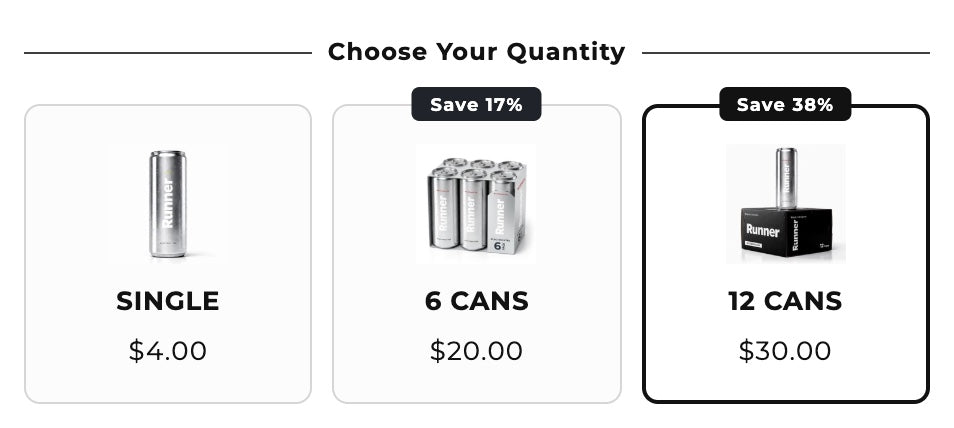
Quantity breaks lower the price per item as shoppers buy more: one for $30, two for $54, three for $75. Most Shopify apps that show these tiers charge more as the tiers sell. We compared 9 quantity breaks apps on what they cost at your revenue, what counts toward the bill and what you get for free. We also cover how far Shopify gets you without an app. We make one of the apps, Section Store, so we say where others beat it. Section Store is a Shopify app with theme sections, bundles, a cart drawer and AI Pages. Section Store Plus is its $15 monthly plan.
What is the best quantity breaks or volume discount app for Shopify?
Bundler is the best free quantity breaks app. Section Store Plus is the best flat price at $15 a month, with a cart drawer included. Pumper and Rapid Bundles are the best capped prices. Kaching Bundles has the most reviews but the steepest price as revenue grows.
Free
Bundler
Quantity breaks and buy X get Y for $0, at any revenue.
Flat price, more offer types
Section Store Plus
$15 a month for quantity breaks, mix and match, A/B tests and a cart drawer.
Capped price
Pumper
Revenue tiers that stop at $49.99 a month.
Most reviews
Kaching Bundles
Rated 5.0 from 6,210 reviews. $14.99 to $299 by revenue.
Compare 9 quantity breaks apps at a glance
"At $5,000" is the monthly price when the app counts $5,000 of revenue in a month. Prices are monthly billing from each Shopify App Store listing and the vendor's pricing page.
| App | Rating | Free option | At $5,000 | Grows with |
|---|---|---|---|---|
| Section Store Plus | 4.9 (2,965) | Free drafts, 14-day trial | $15 | Nothing. Flat |
| Bundler | 4.9 (2,712) | Yes, no cap | $0 | Nothing. Flat |
| Koala Bundles | 4.9 (817) | Dev stores | $19.99 | Bundle revenue, capped at $59.99 |
| Rapid Bundles | 5.0 (1,582) | Up to $100 | $29 | Additional revenue, capped at $59 |
| Wide Bundles | 4.9 (319) | Dev stores | $44.99 | Additional revenue |
| Kaching Bundles | 5.0 (6,210) | Dev stores | $29.99 | Additional revenue, up to $299 |
| Pumper | 4.9 (3,535) | Up to $300 | $29.99 | Extra revenue, capped at $49.99 |
| P: Quantity Breaks | 4.9 (263) | 1 offer, up to $300 | $29.99 | Extra revenue |
| Discounty | 4.9 (1,271) | 10 variants | $9.90–29.90 | Discounted variants |
Wide Bundles' $44.99 is its published tier for $5,000 to $9,999 of additional revenue. Discounty doesn't count revenue. It charges by how many variants you discount: 150 variants for $9.90, 1,000 for $29.90.
What do quantity breaks apps cost as you grow?
The listing price is the price at your smallest size. The table shows each revenue-priced app at four revenue levels, assuming the app counts all revenue from your tiers.
| App | $1,000 | $5,000 | $10,000 | $25,000 |
|---|---|---|---|---|
| Section Store Plus | $15 | $15 | $15 | $15 |
| Bundler | $0 | $0 | $0 | $0 |
| Pumper | $9.99 | $29.99 | $49.99 | $49.99 |
| Koala Bundles | $12.99 | $19.99 | $59.99 | $59.99 |
| Rapid Bundles | $15 | $29 | $29 | $59 |
| P: Quantity Breaks | $14.99 | $29.99 | $59.99 | Not published |
| Wide Bundles | $24.99 | $44.99 | $59.99 | $74.99 |
| Kaching Bundles | $14.99 | $29.99 | $59.99 | $149 |
Ask each app what it counts. Wide Bundles is the only one here that publishes its definition: the gap between the unbundled price and the bundle price. Kaching counts "additional revenue from app", Pumper "extra revenue generated" and Koala "bundle offer revenue". None of those three define it in public.
Can you do quantity breaks on Shopify without an app?
Shopify's own discounts can apply tiered prices in the cart. They can't show a tier table on the product page.
- Automatic discounts. Create one "amount off products" automatic discount per tier, each with a minimum quantity of items. For example: 10% off 2 or more, 20% off 3 or more. If they can't combine, Shopify applies the best one for the shopper.
- The catch. Shoppers see the saving only in the cart. Each tier also uses one of Shopify's 25 active automatic discounts, shared with your apps.
- B2B volume pricing. Shopify B2B catalogs support up to 10 price breaks per product. They apply only to B2B customers set up as companies.
An app shows what Shopify's discounts can't: the tier picker in the buy box, savings badges and a preselected "most popular" tier.
The 9 best Shopify quantity breaks apps
Ratings and review counts are from each App Store listing on October 8, 2026.
We list our app first because we make it. The order isn't a ranking.
1. Section Store Plus: flat price with mix and match and a cart drawer
$15/moSection Store's bundle block shows quantity tiers in your buy box. Each tier can take a percentage off, an amount off or a fixed price, shown per item or as a total. You can add badges like "Most popular", benefit lines and price rounding to .99. The same block runs buy X get Y, mix and match and complete-the-bundle offers. Discounts are native Shopify discounts, so they combine with discount codes and the checkout price matches the cart. A/B tests compare up to 4 versions on paid orders. A cart drawer and AI Pages come in the same plan.
- $15 a month at any revenue
- Tiers for one product or across different products
- Cart drawer with a reward bar included
- Bundler does basic tiers for $0
- No free plan for live offers. Drafts are free
- Each live offer uses one of Shopify's 25 automatic discounts
2. Bundler: best free quantity breaks app
$0–19.99/moBundler's free plan includes volume discounts and quantity breaks, buy X get Y, product page upsells and Shopify POS, with "unlimited revenue and orders". Mix and match and quantity break combinations cost $9.99 a month. Analytics cost $19.99.
- $0 at any revenue
- Works in Shopify POS
- Mix and match costs $9.99 a month
- No cart drawer
3. Pumper: revenue tiers with a $49.99 ceiling
$0–49.99/moPumper is free up to $300 of extra revenue, then $9.99 up to $1,000 and $29.99 up to $5,000. Above that it's $49.99 with no limit. It works with page builders and other apps' cart drawers.
4. Kaching Bundles: most reviewed
$14.99–299/moKaching has the most reviews of any app here. It covers quantity breaks, BOGO, mix and match and free gifts. The price runs from $14.99 to $299 a month by "additional revenue". See our Kaching alternatives.
5. Rapid Bundles: capped at $59
$0–59/moRapid Bundles adds volume discounts, mix and match and build-your-own boxes. It's free up to $100, $15 up to $1,000, $29 up to $10,000 and $59 with no limit.
6. Koala Bundles: cheap middle tiers
$12.99–59.99/moKoala Bundles costs $12.99 up to $1,000 of bundle offer revenue and $19.99 up to $5,000. That's $10 less than Kaching at that level. Above $5,000 it's $59.99 with no cap.
7. Wide Bundles: the clearest revenue rules
$14.99–89.99/moWide Bundles publishes exactly how it counts revenue and every tier, from $14.99 under $500 to $89.99 above $50,000. The bill goes down again in slower months.
8. P: Quantity Breaks & Bundles: B2B-style pricing
$0–59.99+/moPareto's app is free for 1 active offer up to $300 of extra revenue. Paid plans run $14.99 to $59.99 up to $10,000, with customer targeting and a 30-day trial.
9. Discounty: bulk sales, priced by variants
$0–29.90+/moDiscounty runs "buy more, save more" and spend-more discounts along with bulk sales. It charges by discounted variants, not revenue: 10 free, 150 for $9.90, 1,000 for $29.90.
How do you set up quantity breaks on Shopify?
- Pick the product or collection. Start with a consumable or a best seller people buy again.
- Set 2 or 3 tiers. For example 1 unit, 2 units at 10% off and 3 units at 20% off.
- Choose the discount type. Percent off, amount off or a fixed tier price.
- Add the app's block to your product page in the theme editor, next to the add to cart button.
- Preselect one tier and label it. Label a tier "Most popular" only if most buyers pick it.
- Test it on a live order and confirm the checkout price matches the tier.
For bundles of different products, see how to create bundles on Shopify.
How do you set up tiered pricing on Shopify?
You set up tiered pricing on Shopify in one of two ways. B2B customers get volume pricing in a catalog. Every other shopper needs a quantity breaks app. Volume pricing gives a lower unit price at set quantities, with up to 10 price breaks per product. A quantity breaks app shows the tiers on the product page to every shopper.
To add volume pricing for B2B customers in Shopify admin:
- Go to Markets → Catalogs and open the catalog.
- Open Products and pricing.
- Open the Volume pricing column for the product or variant.
- Add the price breaks. Each quantity must be above the minimum order quantity and a multiple of any increment rule.
- Click Done, then Save.
Shopify built volume pricing for B2B orders. Shoppers must reach each quantity on a single variant, since variants don't add up. Read Shopify's quantity rules and volume pricing guide for the details. B2B needs a Shopify plan that supports it.
For regular shoppers, add a quantity breaks app and follow the steps in the section above. Section Store Plus sets each tier as percent off, amount off or a fixed price. Its Shopify discount makes checkout charge the tier price.
Quantity breaks, volume discounts or tiered pricing: what's the difference?
Quantity breaks are preset tiers of one product, picked on the product page. A volume discount lowers the price once the cart holds enough units. Tiered pricing sets a unit price per quantity band, mostly in B2B catalogs.
| Term | What it means | Where you see it |
|---|---|---|
| Quantity breaks | Preset tiers of one product, picked in the buy box | Product page widget |
| Volume discount | A lower price once the cart has enough units | Cart or checkout |
| Tiered pricing | A different unit price per quantity band | B2B catalogs and wholesale |
| Buy more, save more | A bigger saving for each step up in quantity or spend | Product page or cart |
Which quantity breaks app should you pick?
Pick Bundler if you need basic tiers and want to pay $0. Pick Pumper or Rapid Bundles if you like revenue pricing but want a ceiling. Pick Kaching if reviews matter most and your revenue tier stays low. Pick Section Store Plus if you want tiers, mix and match, A/B tests and a cart drawer for $15 a month at any revenue. For every bundle format, see our bundle apps comparison.
How we compared these apps
On October 8, 2026 we read each app's Shopify App Store listing and pricing page, and Shopify's help center for native discounts. Prices are monthly billing in USD. We didn't install each competitor. Their facts come from App Store listings, pricing pages and help centers. We built the Section Store facts from our own product. Sources: Section Store, Bundler, Pumper, Kaching Bundles, Kaching pricing, Rapid Bundles, Koala Bundles, Wide Bundles, P: Quantity Breaks, Discounty.
Frequently asked questions
What are quantity breaks on Shopify?
Quantity breaks are price tiers for buying more of one product, like 10% off two and 20% off three. Shoppers pick a tier on the product page. An app shows the tiers and applies the discount at checkout.
Is there a free quantity breaks app for Shopify?
Bundler is the best free quantity breaks app. Its free plan includes quantity breaks and buy X get Y with no revenue or order cap. Pumper is free up to $300 of extra revenue, and P: Quantity Breaks is free for one offer up to $300.
Can Shopify do quantity discounts without an app?
Shopify can apply quantity discounts in the cart. It can't show the tiers on the product page. Create one automatic discount per tier with a minimum quantity of items, and Shopify applies the best one. Each tier uses one of 25 automatic discount slots.
Do quantity breaks work with discount codes?
It depends on the app and your combination settings. Section Store's tier discounts combine with order, product and shipping discounts, so codes still work. Check each app's stacking rules before you install. For apps by discount type, see Shopify discount apps compared.
How many quantity break tiers should I offer?
Offer two or three tiers. More tiers make the choice harder. Make each step's saving clear, and preselect the tier you want most shoppers to take.
What is the difference between quantity breaks and bundles?
Quantity breaks discount more units of the same product. Bundles discount different products bought together. Most apps here do both.
Which quantity breaks app is cheapest at high revenue?
Bundler is free at any revenue, and Section Store Plus is $15 at any revenue. Pumper stops at $49.99 and Rapid Bundles at $59. Kaching reaches $299 above $50,000 of additional revenue.
Prices and features checked on October 8, 2026. We update this page when they change.


