
Upsell vs cross-sell on Shopify: the difference, with examples
An upsell changes the item in the cart, and a cross-sell adds a new one. See both on a $20 candle, in four store types and at each stage of a Shopify store. Prices checked November 5, 2026.


Short answer
An upsell moves a shopper to a bigger, better or multi-unit version of the same product, such as a 3-pack instead of one candle. A cross-sell adds a different product that goes with it, such as matches. Upsells suit the product page and cross-sells suit the cart drawer. Section Store Plus runs both for $15 a month, flat.
- Swap or add: if the offer changes the item, it's an upsell. If it adds a new kind of item, it's a cross-sell.
- Quantity breaks were 44% of 1,275 bundle offers in Section Store's study, and add-on offers were 7%.
- Shopify's free Search & Discovery app gives up to 10 complementary and 10 related products per product, on the product page only.
- Apps inside Shopify's checkout steps need Shopify Plus. Thank-you page apps work from the Basic plan up.
- Section Store Plus covers the product page and cart drawer for $15 a month, flat. It has no checkout or post-purchase upsells.
The difference between an upsell and a cross-sell is what happens to the item. An upsell moves a shopper to a bigger, better or multi-unit version of the product they picked. A cross-sell adds a different product that goes with it. A 3-pack instead of one candle is an upsell. Matches with it are a cross-sell.
Section Store is a Shopify app with bundles, a cart drawer, AI Pages and theme sections. Section Store Plus is its plan at $15 a month, flat. We make it.
What are upselling and cross-selling?
Upselling is selling a bigger, better or multi-unit version of the item a shopper wants. Cross-selling is selling a different item that goes with it. If the offer changes the item, it's an upsell. If it adds a new kind of item, it's a cross-sell.
Apps blur the words. Most "upsell" widgets are cross-sells, including Section Store's Products upsell block. Shopify's recommendation types are cleaner. Related products are substitutes, which act like upsells, and complementary products are add-ons, which act like cross-sells.
One shopper, two offers
Illustration, invented prices
Linen candleIn the cart
$20
Upsell
Changes the item
Linen candle 3-packReplaces the single candle
$45$60
$60 − 25% = $45 order
Product cost
$24
Kept
$21
Cross-sell
Adds new items
Long matchesAdded to the candle
$4
Wick trimmerAdded to the candle
$12
$20 + $4 + $12 = $36 order
Product cost
$14
Kept
$22
Example product costs: candle $8, matches $1, trimmer $5.
The 3-pack builds the bigger order and the smaller profit. The $45 order keeps $21 after product cost, and the $36 order keeps $22. Run this sum with your own costs before you set a discount.
The 25% is real. Across 397 stores whose pages expose the exact bars, the median quantity break was 15% off at 2 units and 25% at 3. That's from Section Store's study of 1,275 bundle offers on 4,861 Shopify stores, captured October 16 to 23, 2026. We read public product pages and never added to a cart.
What is the difference between upsell and cross-sell?
An upsell changes the item in the cart, and a cross-sell adds a new one. That decides where each offer goes and how you price it.
| Upsell | Cross-sell | |
|---|---|---|
| What changes | The item: bigger, better or more units | The basket: a new item joins |
| Shopper's question | "Is the better deal worth it?" | "What else do I need?" |
| Best stage | Product page, before the choice | Cart drawer, after the choice |
| Price guide | Median 15% off at 2 units, 25% at 3 | Same price as the main item or lower |
| Shopify's free tool | Related products, your variants | Complementary products block |
| Section Store Plus | Quantity breaks | Products upsell, Upsell, Addons, checkbox upsells, Order addon |
What are examples of upselling on Shopify?
Upselling examples on Shopify come in four kinds: more units, a bigger size, a better version and a repeat order.
- More units. A candle shop sells 1, 2 or 3 candles at rising discounts. See more quantity discount examples.
- Bigger size. A skincare brand shows the 60 ml serum beside the 30 ml.
- Better version. An apparel shop shows the heavyweight linen shirt beside the regular one.
- Repeat order. A coffee roaster offers subscribe and save on the same bag. That needs a subscription app.
What are examples of cross-selling on Shopify?
Cross-selling examples on Shopify come in three kinds: the item it needs, the item that matches and the small extra.
- The item it needs. A coffee roaster shows paper filters when a dripper is in the cart.
- The item that matches. An apparel shop suggests a belt with trousers. Add a discount and you have a bundle, so see how to price a bundle.
- The small extra. A pet shop adds shipping protection as a one-tap toggle in the cart.
How do upsells and cross-sells change by store type?
Upsells and cross-sells change with what a store sells. Consumables suit more units, and fashion suits matching items. These four stores use invented products.
Coffee roaster
Main item: Ethiopia beans, 12 oz, $18
Upsell
Second bag at 15% off
$36 − 15% = $30.60
Order value +$12.60
Quantity breaks on the product page.
Cross-sell
Paper filters, $6
$18 + $6 = $24
Order value +$6
Products upsell rule in the cart drawer.
Skincare brand
Main item: Vitamin C serum, 30 ml, $32
Upsell
60 ml size, $54
$54 − $32 = $22
Order value +$22
Your theme's variant picker.
Cross-sell
SPF moisturizer, $28
$32 + $28 = $60
Order value +$28
Addons block on the product page.
Pet shop
Main item: Chicken dog treats, $12
Upsell
3 bags at 25% off
$36 − 25% = $27
Order value +$15
Quantity breaks on the product page.
Cross-sell
Treat pouch, 10% off, $9
$12 + $9 = $21
Order value +$9
Bundle checkbox upsell, with its own discount.
Apparel
Main item: Linen shirt, $60
Upsell
Heavyweight linen shirt, $85
$85 − $60 = $25
Order value +$25
Shopify's Related products on the product page.
Cross-sell
Woven belt, $30
$60 + $30 = $90
Order value +$30
Products upsell in the cart drawer.
Where does each offer work on a Shopify store?
Upsells work best on the product page, while the shopper is still choosing. Cross-sells work best in the cart drawer, after the choice is made. Section Store Plus covers both stages. Checkout and the thank-you page need a different app.
Stage 1
Product page
Best fit
Upsell, with one small cross-sell.
Section Store
Quantity breaks, bundles, checkbox upsells, Upsell and Addons blocks.
Covered
Stage 2
Cart drawer
Best fit
Cross-sell, once the item is chosen.
Section Store
Products upsell, Order addon, reward bar.
Covered
Stage 3
Checkout
Best fit
A small cross-sell. Needs Shopify Plus.
Section Store
No offers here. This stage takes a checkout app.
Not covered
Stage 4
Thank-you page
Best fit
A cross-sell or reorder offer.
Section Store
No offers here. This stage takes a post-purchase app.
Not covered
Shopify draws the line at checkout. Apps on the information, shipping and payment pages need Shopify Plus, Shopify's top plan, which is separate from Section Store Plus. Thank-you page apps work from the Basic plan up. See Shopify upsell apps compared for those stages.
Cart drawers take the most offers in one vendor's data. Growth Suite, another Shopify app, reports average take rates of 12% in the cart drawer, 9% at checkout, 7% on the product page and 6% after purchase, across 250 stores. That's vendor data, and single stores ranged from under 2% to over 20%. If your theme still opens a full page, read cart drawer vs cart page.
Stores lean hard on the product page upsell. In our study, quantity breaks outnumbered add-on offers almost 6 to 1. Add-on checkboxes appeared on 13% of widgets. The study counted bundle widgets, so recommendation carousels aren't in those numbers.
How do you set up upsells and cross-sells on Shopify for free?
Shopify's free route is the Search & Discovery app, which shows recommendations on product pages. Your complementary picks are the cross-sell. Related products fill in automatically.
- In Shopify admin, open Apps → Search & Discovery.
- Click Product recommendations, then Add recommendations.
- Pick a product. Select up to 10 complementary products and up to 10 related products. Click Save.
- Go to Online Store → Edit theme → Products. Add the Complementary products block to the product information section.
The free route stops at the product page. Shopify limits the block to compatible themes and one per page, and you choose picks product by product. On November 5, 2026, neither Dawn's nor Horizon's cart drawer code showed recommendations.
A quantity upsell has its own gap. Shopify applies automatic discounts in the cart and at checkout, so the product page doesn't advertise the deal. Here's how to show an automatic discount on the product page.
How do you upsell and cross-sell with Section Store?
Section Store Plus runs both offers from the product page to the cart drawer on one $15 plan. Quantity breaks are the true upsell, and the other five tools are cross-sells.
| Tool | Where | Offer | What the shopper sees |
|---|---|---|---|
| Quantity breaks | Product page | Upsell | More units at rising, real Shopify discounts |
| Bundle checkbox upsells | Product page | Cross-sell | A tick box with its own discount |
| Addons block | Product page | Cross-sell | A switch, checkbox or radio, added with the main product |
| Upsell block | Product page | Cross-sell | Your picks with a one-tap add |
| Products upsell | Cart drawer | Cross-sell | Shopify's recommendations or your rules |
| Order addon | Cart drawer | Cross-sell | A one-product toggle, never pre-checked |
The upsell: a quantity break on your best seller.
- In Section Store, open Bundles, click Add Bundle and pick Quantity breaks for the same product.
- Set the tiers, such as 1 unit at full price, 2 at 15% off and 3 at 25% off.
- Optional: turn on Checkbox upsells and add a wick trimmer at 10% off.
- Publish the bundle.
The cross-sell: a rule in the cart drawer.
- Open Cart Drawer, click Add block and pick Products upsell.
- Set Recommend by to Manual rules and add a rule.
- Under When cart contains, pick a collection, such as Candles. Under Recommend these products, pick up to 5.
- Turn on Hide products already in cart. Save and switch the cart on.
For automatic picks, set Recommend by to AI recommendations. Those are Shopify's own, based on the last item added. A reward bar in the same drawer pulls orders toward your free shipping threshold.
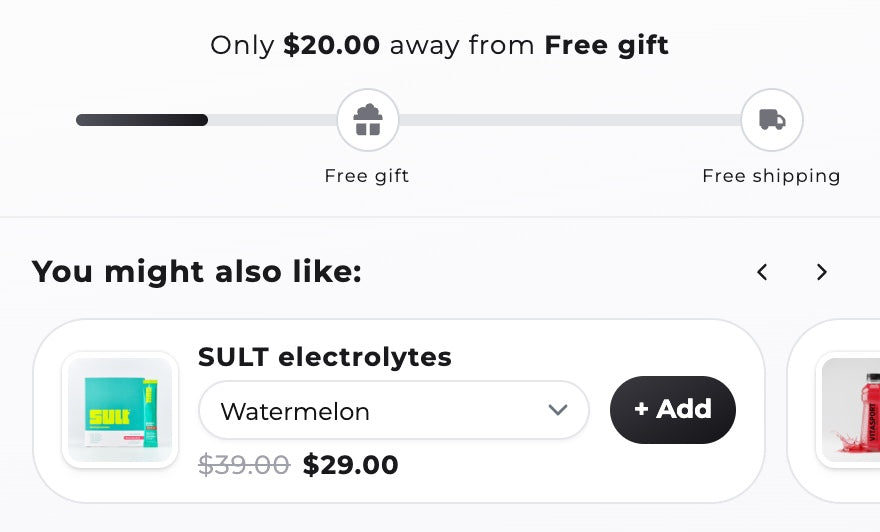
Your own orders settle the $45 or $36 question. Section Store Plus A/B tests up to 4 versions of a bundle or cart on paid orders. Setup and preview are free. Going live needs Plus, with a 14-day free trial.
Section Store has no checkout or post-purchase upsells, and its recommendations are Shopify's. Only quantity breaks and checkbox upsells take discounts.
What does it cost to run upsells and cross-sells on Shopify?
Running upsells and cross-sells on Shopify costs from $0 to about $80 a month at 400 orders.
| App | Rating | Offers shown on | 400 orders |
|---|---|---|---|
| Search & Discovery | 2.6 (514) | Product page | $0 |
| Selleasy Starter | 4.9 (2,770) | Product page, cart, thank-you page | $9 |
| Section Store Plus | 4.9 (3,012) | Product page, cart drawer | $15 |
| ReConvert | 4.8 (3,131) | Product page, cart, checkout, post-purchase | $39.99 |
| Aftersell Complete | 4.9 (1,119) | Product page, cart, checkout, post-purchase | From $79.99 |
Section Store Plus's $15 also pays for the cart drawer, bundles, A/B tests and AI Pages. Rivals bill those as separate apps, often priced by orders or revenue. See how to increase average order value on Shopify for the sums.
Start with Section Store Plus. Put a quantity break on your best seller and one Products upsell rule in the cart drawer. That's both offer types for $15 a month at any order count, with the cart drawer, bundles, A/B tests and AI Pages in the same plan. Skip it if one-click offers after payment are your main goal. ReConvert or Aftersell fits that job.
What upsell and cross-sell mistakes lose the sale?
Most upsell and cross-sell mistakes ask too much of the shopper at the wrong moment.
- Stacking offers. Quantity tiers, two add-ons and a popup on one page stall the sale. Run one main offer per stage.
- Pricing the add-on above the item. Shopify advises add-ons "lower or equivalent in cost to the original product". A $40 diffuser beside a $20 candle starts a second decision.
- Pre-ticking the box. A charge the shopper didn't choose costs you trust. Section Store's order addon starts off. Leave bundle checkboxes unticked too.
- Scoring by order value. The $45 order above kept less than the $36 order. Check margin before you call a winner.
How we checked
On November 5, 2026 we read Shopify's help pages and Dawn's and Horizon's code on GitHub. Rival ratings and prices come from App Store listings that day. Section Store's features come from its code. Store examples are invented.
Frequently asked questions
Can you give me an example of upselling?
A pet shop sells a $12 bag of treats. On the product page it offers 3 bags at 25% off for $27. The shopper spends $15 more and the shop packs one parcel. That's an upsell, because the item stays the same and the quantity grows.
Is it upsell or up sell?
Upsell, as one word. Shopify's App Store writes "upsell and cross-sell" in its feature lists, and cross-sell keeps its hyphen. The verb forms are upselling and cross-selling.
Is a bundle an upsell or a cross-sell?
A bundle of different products is a cross-sell with a discount, such as a cleanser, serum and SPF set. A multipack of one product is an upsell, such as 3 candles for $45. Section Store Plus runs both as real Shopify discounts.
How do I upsell on Shopify without a paid app?
Use Shopify's free Search & Discovery app. Pick up to 10 complementary and 10 related products per product, then add the Complementary products block in a compatible theme. It works on the product page only. Cart upsells and quantity offers need code or an app.
Can I upsell at checkout on Shopify?
Upsells inside the checkout steps need Shopify Plus and an app that supports them. Thank-you page apps work from the Basic plan up. Section Store covers the product page and cart drawer, with no checkout or post-purchase offers. Selleasy, ReConvert and Aftersell reach those stages.
Should I start with upsells or cross-sells?
Start with one of each, because they work at different stages. Put a quantity break on your best seller and one cross-sell rule in the cart drawer. Section Store Plus does both for $15 a month. Then A/B test on paid orders and keep the winner.
Prices and features checked on November 5, 2026. We update this page when they change.


