

Best Shopify cart drawer apps (2026): 9 slide carts compared by price
Cart drawer apps compared by what they cost at 100 to 3,000 orders a month and what each includes: reward bar, upsells and free gifts. Prices checked October 2026.


Short answer
Section Store Plus is the best flat price with the most included: a cart drawer and bundles for $15 a month at any order volume. Essent Cart Drawer is the best free start, free up to 30 drawer orders a month. Qikify is the cheapest standalone flat price at $14.99. Kaching CartDrawer has the most reviews of the cart-only apps.
- 6 of 9 cart drawer apps bill by monthly orders.
- At 800 orders a month, order-priced carts cost $38.99 to $54.99.
- Qikify ($14.99), Section Store Plus ($15) and Amp ($29.99) charge a flat price.
- Dawn's built-in cart drawer is free but has no reward bar or upsells.
- A good cart drawer has a reward bar, upsells, free gifts and a discount code field.
A cart drawer, also called a slide cart or side cart, slides in when a shopper adds a product. Shoppers keep shopping instead of landing on a cart page. The good ones add a free shipping bar, upsells and free gifts, meant to lift order value. Most cart drawer apps bill by your monthly orders, so the price rises as you sell more. We compared 9 cart drawer apps on what they cost at your order volume and what each one includes. We make one of them, Section Store, so we say where others beat it. Section Store is a Shopify app with theme sections, bundles, a cart drawer and AI Pages. Section Store Plus is its $15 monthly plan.
What is the best cart drawer app for Shopify?
Section Store Plus is the best flat price with the most included: a cart drawer plus bundles for $15 a month at any order volume. Essent Cart Drawer is the best free start, with every feature free up to 30 drawer orders a month. Qikify is the cheapest standalone flat price at $14.99. Kaching CartDrawer has the most reviews of the cart-only apps.
Flat price, bundles included
Section Store Plus
$15 a month for a cart drawer, bundles, quantity breaks and A/B tests.
Best free start
Essent Cart Drawer
Every feature free up to 30 drawer orders a month.
Cheapest flat standalone
Qikify Slide Cart
Upsells and a reward bar for $14.99, at any order count.
Most reviews, cart-only
Kaching CartDrawer
Rated 5.0 from 1,468 reviews. $9.99 to $199.99 by orders.
Compare 9 cart drawer apps at a glance
"At 300 orders" is the monthly price for a store with 300 orders a month. Prices are monthly billing from each Shopify App Store listing and the vendor's pricing page.
| App | Rating | Free option | At 300 orders | Billed by |
|---|---|---|---|---|
| Section Store Plus | 4.9 (2,965) | Free setup, 14-day trial | $15 | Flat |
| Essent Cart Drawer | 5.0 (1,070) | 30 drawer orders | $23.99 | Drawer orders |
| Qikify Slide Cart | 4.9 (418) | Basic cart | $14.99 | Flat |
| Kaching CartDrawer | 5.0 (1,468) | Dev stores | $24.99 | Orders |
| Monster Cart | 4.7 (537) | 50 orders | $24.99 | Orders |
| iCart | 4.7 (452) | First 100 orders | $29 | Orders |
| Amp Slide Cart | 5.0 (776) | Basic cart | $29.99 | Flat |
| UpCart | Not on App Store | Dev stores | $34.99 | Orders |
| Rebuy | 4.7 (854) | Dev stores | From $25 | Orders, by module |
Essent counts only orders where the shopper opened its drawer or it added items. Monster's prices are its launch rates for stores that install by October 31, 2026. Qikify and Amp charge the paid price shown for upsells and a reward bar. Their free plans are basic carts.
What does a cart drawer app cost as your orders grow?
| App | 100 | 300 | 800 | 1,500 | 3,000 |
|---|---|---|---|---|---|
| Section Store Plus | $15 | $15 | $15 | $15 | $15 |
| Qikify Slide Cart | $14.99 | $14.99 | $14.99 | $14.99 | $14.99 |
| Amp Slide Cart | $29.99 | $29.99 | $29.99 | $29.99 | $29.99 |
| Essent Cart Drawer | $13.99 | $23.99 | $38.99 | $58.99 | $88.99 |
| Kaching CartDrawer | $14.99 | $24.99 | $39.99 | $59.99 | $89.99 |
| Monster Cart | $14.99 | $24.99 | $39.99 | $64.99 | $89.99 |
| iCart | $9 | $29 | Not listed | Not listed | Not listed |
| UpCart | $29.99 | $34.99 | $54.99 | Not listed | Not listed |
iCart lists tiers up to 500 orders and says its top plan is $129 above 5,000 orders. UpCart's listing stopped at 1,000 orders, and on October 13, 2026 it said the app is not currently available. Rebuy builds a custom price from the modules and orders you choose.
Do you need a cart drawer app at all?
You don't need an app for a basic drawer. Dawn and many free Shopify themes have one built in. In the theme editor, open Theme settings → Cart and set Cart type to Drawer.
The built-in drawer shows the items, a note field and the checkout button. It has no free shipping bar, upsells, free gifts or order addons. Those are what an app adds. They're the parts meant to raise order value.
What should a good cart drawer include?
A good cart drawer has a reward bar, upsells, free gifts and a discount code field.
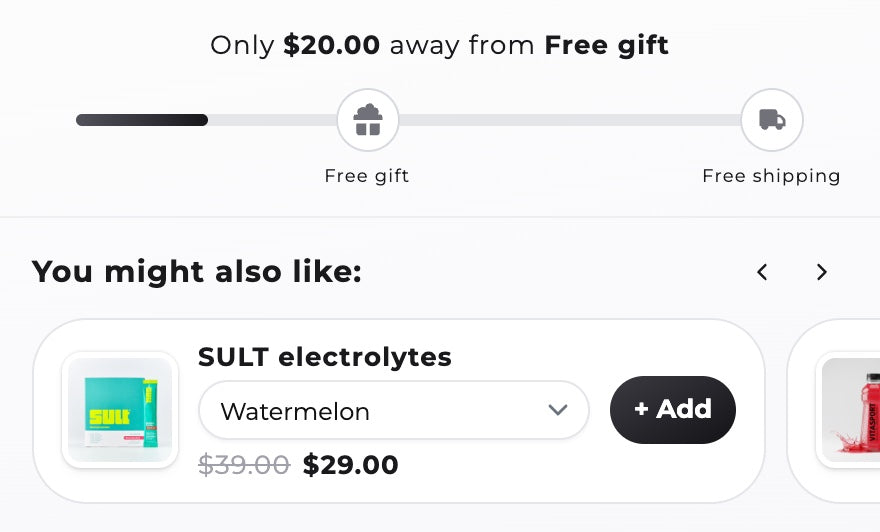
- A reward bar. Shows how far the shopper is from free shipping, a discount or a free gift.
- Upsells. Related products with a one-tap add button.
- Free gifts that add and remove themselves as the cart total changes.
- Order addons like shipping protection, as an opt-in toggle.
- A discount code field, so shoppers see the final price before checkout.
- Trust badges and payment icons near the checkout button.
- Per-market thresholds if you sell in several currencies.
- A/B tests to check that a change raises revenue, not just clicks.
The 9 best Shopify cart drawer apps
Ratings and review counts are from each App Store listing on October 8, 2026.
We list our app first because we make it. The order isn't a ranking.
1. Section Store Plus: flat price, bundles included
$15/moSection Store's cart drawer replaces your theme's drawer and opens when shoppers add to cart. Its reward bar unlocks free shipping, an order discount or free gifts, by cart total or item count, with fixed thresholds per market. Free gifts add and remove themselves. Upsells come from Shopify's product recommendations or your own rules. You also get order addons like shipping protection, a discount code field, a cart timer, trust badges and payment icons. Rewards run through one Shopify discount that combines with discount codes. You can A/B test up to 4 cart versions on revenue per visitor. Bundles, quantity breaks and AI Pages come in the same plan.
- $15 a month at any order volume
- Bundles and quantity breaks in the same plan
- Rewards use just 1 of Shopify's 25 automatic discounts
- No express checkout buttons in the drawer
- No post-purchase upsells
- Cart analytics only inside A/B tests
2. Essent Cart Drawer: best free start
$0–198.99/moEvery Essent plan has every feature: slide cart, upsells, reward bar, sticky add to cart, countdown timer, markets and translations. Only the order count changes the price. It's free up to 30 drawer orders a month, then $8.99 up to 99 and $198.99 at 10,000 or more. It counts only orders that touched the drawer, and its pricing page explains exactly what counts.
- Real free plan with every feature
- Clear rules on what it counts
- Price rises with orders, up to $198.99
- Cart only. Bundles are a separate app
3. Kaching CartDrawer: most reviewed
$9.99–199.99/moKaching CartDrawer adds a free shipping and free gift bar, an upsell carousel, a shipping protection toggle, an urgency timer, trust badges and payment icons. It costs $9.99 up to 99 orders, $24.99 up to 499 and $199.99 at 10,000 or more, per its pricing page. Bundles are a separate Kaching app. See our Kaching alternatives.
4. Qikify Slide Cart: cheapest flat standalone
$0–14.99/moThe free plan is a slide cart with a sticky add to cart, announcement bar, order note and gift wrapping. Premium adds cart upsells, a reward bar and in-cart variant editing for a flat $14.99. A $99 plan is for Shopify Plus stores.
5. Amp Slide Cart: flat price, express checkout
$0–49.99/moAmp's free plan includes accelerated checkout buttons, a discount code box and a terms section. Upsells, a free shipping and gift bar and shipping protection start on Growth at $29.99. Amp says that price "never increases with sales".
6. Monster Cart: low entry, launch pricing
$0–179.99/moMonster Cart includes free gifts, one-tick upsells, buy more save more and frequently bought together. Its launch rates run from free up to 50 orders to $179.99 above 10,000, for stores that install by October 31, 2026.
7. iCart: bundles and volume discounts in the cart
$9–129/moiCart adds a multi-tier progress bar, cart upsells, product bundles and volume discounts. New installs get their first 100 orders free. After that it's $9 up to 100 orders a month, $19 up to 200, $29 up to 500 and $129 above 5,000.
8. UpCart: not on the App Store right now
$29.99–54.99+/moOn October 13, 2026, UpCart's App Store listing said: "This app is not currently available on the Shopify App Store." New stores can't install it there. UpCart is owned by Rokt. It builds the cart from modules: announcements, upsells, rewards, add-ons and custom HTML and CSS. On October 8 it cost $29.99 for up to 200 orders. See our UpCart alternatives.
9. Rebuy: for large brands
From $25/moRebuy is a personalization suite. Its cart is one module next to checkout, post-purchase, search and A/B flows. Pricing starts at $25 and scales with orders and the modules you pick.
How do you add a cart drawer to Shopify?
Install a cart drawer app, then turn on its app embed in the theme editor.
- Install the app and open its cart editor.
- Add the blocks you want: reward bar, upsells, trust badges and a discount code field.
- Set your reward thresholds. Put free shipping a little above your average order value.
- Turn on the app embed. In the theme editor, open App embeds and switch on the cart drawer.
- Test on your store. Add a product, check the drawer opens, unlock a reward and go to checkout.
How do you add a free shipping bar to the Shopify cart?
Use a cart drawer app with a reward bar. Dawn's cart drawer doesn't include one. Some paid themes do, so check your theme's cart settings first. Set a free shipping tier at your threshold, for example $50. The bar then shows how much the shopper has left to spend.
- Pick the threshold from your numbers. Start a little above your average order value, then test.
- Write a short message with the amount left, like "Only $12 away from free shipping".
- Add a second tier, like a free gift, to give big carts a next goal. See how to auto-add a free gift on Shopify.
- Set fixed thresholds per market if you sell in several currencies, so the goal stays a round number.
How do you set a free shipping threshold?
Set your free shipping threshold a little above your average order value. The shopper then needs one more item to reach it. Check that the margin on that extra item covers the shipping you give away.
Take an example store with a $40 average order and $6 shipping. A $50 threshold asks the average shopper to add $10 more. The extra $10 of sales must earn at least $6 of margin for free shipping to pay for itself. Find your average order value in Shopify admin under Analytics. Then test one threshold for two weeks before you change it.
Which cart drawer app should you pick?
Use your theme's drawer if you only need a slide-out cart. Pick Essent if you're small and want every feature free to start. Pick Qikify or Amp if you want one flat-priced cart app. Pick Kaching CartDrawer if reviews matter most and your orders stay low. Pick Section Store Plus if you want a cart drawer and bundles for $15 a month, however many orders you get.
How we compared these apps
On October 8, 2026 we read each app's Shopify App Store listing and the vendor's pricing page. Prices are monthly billing in USD. We didn't install each competitor. Their facts come from App Store listings, pricing pages and help centers. We built the Section Store facts from our own product. Sources: Section Store, Essent Cart Drawer, Kaching CartDrawer, Qikify Slide Cart, Amp Slide Cart, Monster Cart, iCart, UpCart, Rebuy. For upsells outside the cart, see our upsell apps comparison.
Frequently asked questions
What is a cart drawer on Shopify?
A cart drawer, also called a slide cart or side cart, is a panel that slides in from the side when a shopper adds a product. It shows the cart without leaving the page. Apps add a free shipping bar, upsells and free gifts to it.
Does Shopify have a built-in cart drawer?
Many Shopify themes have one built in. In Dawn, open Theme settings → Cart and set Cart type to Drawer. The built-in drawer has no reward bar, upsells or free gifts.
What is the best free cart drawer app?
Essent Cart Drawer is free with every feature up to 30 drawer orders a month. Amp and Qikify have free basic carts without upsells. Monster Cart is free up to 50 orders on its current launch pricing.
How much does a cart drawer app cost?
Most cost $9 to $30 a month for a small store and rise with orders, up to about $200 above 10,000 orders. Flat-priced options are Qikify at $14.99, Section Store Plus at $15 and Amp at $29.99.
Does a cart drawer increase average order value?
It can, through the free shipping bar, upsells and free gifts. Results depend on your products and prices. Run an A/B test against your current cart before you keep it. For seven more tactics, see how to increase average order value on Shopify.
Will a cart drawer app slow down my store?
Every cart app loads a script on each page. Test your store with PageSpeed Insights before and after you install, and remove any cart app you stop using.
Can I use a cart drawer app with my theme?
Most cart drawer apps replace the theme's drawer through an app embed. Check the app's listing for your theme, and test add to cart, quick add and the cart icon before going live.
Prices and features checked on October 8, 2026. We update this page when they change.


